

WHMCS WhatsApp notifications: official API vs WhatsApp Web
12 min read · By the Shroti Host team, founded by Priyanshu Shroti
Short answer: WHMCS cannot send WhatsApp messages on its own: client reminders go out by email, and its Notifications feature ships with Slack and Email only. You add WhatsApp with a module or custom code, over either Meta's official Cloud API (approved templates, a charge per delivered message) or an unofficial WhatsApp Web gateway (no template approval, but the number can be restricted).
This guide is for hosting companies and resellers who bill through WHMCS and whose clients read WhatsApp faster than email. It covers what WHMCS does out of the box, the two real ways to add WhatsApp, and how they compare on cost, template approval, consent and account risk.
We make a WHMCS module for this, and it uses the unofficial route. That route has a real downside, which this post states before it describes the module.
Can WHMCS send WhatsApp messages on its own?
No. Stock WHMCS has no WhatsApp channel for clients or for staff. The WHMCS 9.1 documentation, read on 20 November 2026, describes two built-in systems, and neither reaches WhatsApp.
Client reminders are emails. The payment reminder settings live at Configuration > System Settings > Automation Settings, under Billing Settings: Payment Reminder Emails, Invoice Unpaid Reminder, and the First, Second and Third Overdue Reminder. Each one sends an email template.
The feature called Notifications is for your team. The docs describe it as a way for WHMCS to "notify you in real time as events occur", and list two providers: Slack and Email. You create rules at Configuration > System Settings > Notifications, for example to alert a support channel when a high priority ticket opens.
WHMCS does leave the door open for developers. The same page says you can add a provider by writing a custom notification module, using the unencoded Email module as a starting point. For client messages, the invoice hooks (InvoiceCreated, InvoicePaid, AddInvoicePayment, InvoicePaymentReminder) and the EmailPreSend hook, which "runs prior to any templated email being sent", give custom code a place to act.
What are the ways to add WhatsApp to WHMCS?
There are two transports, and every module, script or automation tool sits on top of one of them. The first is the official WhatsApp Business Platform, usually through its Cloud API. The second is an unofficial gateway that links a normal WhatsApp number the way WhatsApp Web does and sends through that session.
How you connect WHMCS to the transport is a separate choice. You can install a module, write your own hook that calls an API when an invoice is created, or pass events through a middleware automation tool. A hand-written hook is fine for one or two message types (our guide to custom WHMCS module development covers what that work involves). A module earns its place when you need a queue, retries, a log and opt-outs. Choose the transport first, because it decides your cost, paperwork and risk.
How does the official WhatsApp Cloud API route work?
On the official route, Meta approves what you send and charges you for each delivered message. You can connect to the Cloud API directly with a Meta business account or through a provider that resells access, and a provider may add its own fee on top of Meta's rates.
Three rules from Meta's documentation shape how it works for billing messages:
- Templates. Meta's template documentation says template messages are the only type you can send outside a customer service window, and a template must have the status APPROVED before you can use it. An invoice reminder is a message you start, so it needs an approved template.
- Pricing. Meta's pricing page says it charges per message, only when a message is delivered, and that the rate depends on the category (marketing, utility or authentication) and on the country calling code of the recipient. Free-form replies are only possible inside a 24-hour window that opens when the customer messages you. Rates change, so read the current rate card for India before you budget.
- Opt-in. Meta's opt-in guidance says businesses must obtain opt-in before messaging people, and must clearly state the business name the person is opting in to.
The WhatsApp Business Messaging Policy adds that Meta may limit or remove your access if you break the rules. The official route has enforcement too, but you are using the product as WhatsApp intends.
What is an unofficial WhatsApp Web gateway, and what is the risk?
An unofficial gateway sends from an ordinary WhatsApp number by holding a linked-device session, the same kind WhatsApp Web uses. You scan a QR code once, and the gateway sends through that session when your software asks. There are no templates to approve and no per-message bill from Meta.
The risk is that WhatsApp does not permit this. The WhatsApp Terms of Service list "bulk messaging, auto-messaging, auto-dialing, and the like" as impermissible uses. WhatsApp's help center says its products "are not intended for bulk or automated messaging", and that using or linking an account to unofficial versions of WhatsApp violates the terms and can lead to a temporary or permanent ban.
You save the template approval and the per-message charge, and in return you accept that WhatsApp can restrict or ban the number at any time. No gateway or module can remove that risk. Software can only lower the odds by sending less, slower, and only to people who expect the message.
Cloud API vs WhatsApp Web gateway: how do they compare?
The official Cloud API costs more per message and takes more setup, and it is the route WhatsApp permits for automated business messages. An unofficial gateway is cheaper and faster to start, and it puts the number at risk.
| Factor | Official Cloud API | Unofficial WhatsApp Web gateway |
|---|---|---|
| Cost per message | Meta charges per delivered message, by category and recipient country. A provider may add a fee. | No charge from Meta. You pay for the gateway account and any module. |
| Template approval | Required. Messages you start must use a template with APPROVED status. | None. You write the text yourself and can change it any time. |
| Opt-in | Required by Meta's policy before you message anyone. | Nothing checks it for you. Collect it anyway: people report messages they did not expect. |
| Account risk | Meta can limit or remove access for policy violations. Permitted use within the rules. | Outside WhatsApp's terms. The number can be restricted or banned with little or no warning. |
| Message types | Approved templates at any time. Free-form messages only inside the 24-hour customer service window. | Free-form text and attachments from a normal account, at any time. |
Which WHMCS events are worth sending on WhatsApp?
Send the messages a client would thank you for, and leave the rest on email. That means messages tied to money, access or a conversation the client started. These rules apply on either route and matter most on an unofficial gateway.
- Worth sending: invoice created, payment reminder, payment received, your reply to a client's ticket, service suspended or reactivated, and one-time codes.
- Better left on email: newsletters, upsells, long welcome messages and anything the client did not ask for.
- Get opt-in. WHMCS has a built-in opt-in for marketing emails but nothing for WhatsApp, so add your own consent step at signup and honor opt-outs quickly.
- Use a dedicated number, not the one you run sales or support chats on. If it is restricted, your main line still works.
- Keep volume low and steady, and send during the day in IST.
- Keep email switched on. WhatsApp is a second channel for the same notice, so a failed message never means a missed invoice.
What does WhatsApp Manager for WHMCS automate?
WhatsApp Manager for WHMCS is our addon that turns WHMCS emails and events into WhatsApp messages sent from your own number. It sends through a WAShroti gateway account over an unofficial WhatsApp Web transport. It does not use Meta's Cloud API, it is not made or endorsed by Meta, WhatsApp or WHMCS, and the risk described above applies to it.
What it does, as checked against the code of the release going on sale:
- Client notifications. It hooks EmailPreSend, so a WHMCS email event can have a matching WhatsApp template. It ships with 110 default templates: 73 client email events, 20 admin alerts and 17 hook events such as order paid, order accepted, service created, suspended and unsuspended, and login alerts.
- Invoice PDFs. Invoice messages can carry the invoice as a PDF attachment.
- Ticket messages. Clients get your ticket replies. One admin WhatsApp number gets alerts for new tickets, client replies and paid invoices.
- Templates you can edit. Templates take WHMCS merge fields, with a preview, a length check and a restore to default. Upgrades do not overwrite your edits.
- Phone verification by one-time code, with an optional checkout gate and an order hold until the number is verified. Login with WhatsApp exists and is off by default.
- Client choice. A client area page lets the account owner choose which WhatsApp messages to receive, and admins keep a do-not-message list.
- A queue and a log. Every message is queued and logged, sent by the module's own cron once a minute, and retried up to 3 times.
- Sending limits. New numbers contacted per day are capped at 20 after a warm-up that starts at 5 (codes are exempt), and sending pauses if undelivered messages rise or WhatsApp appears to restrict the number. These limits contain damage. They cannot prevent a ban.
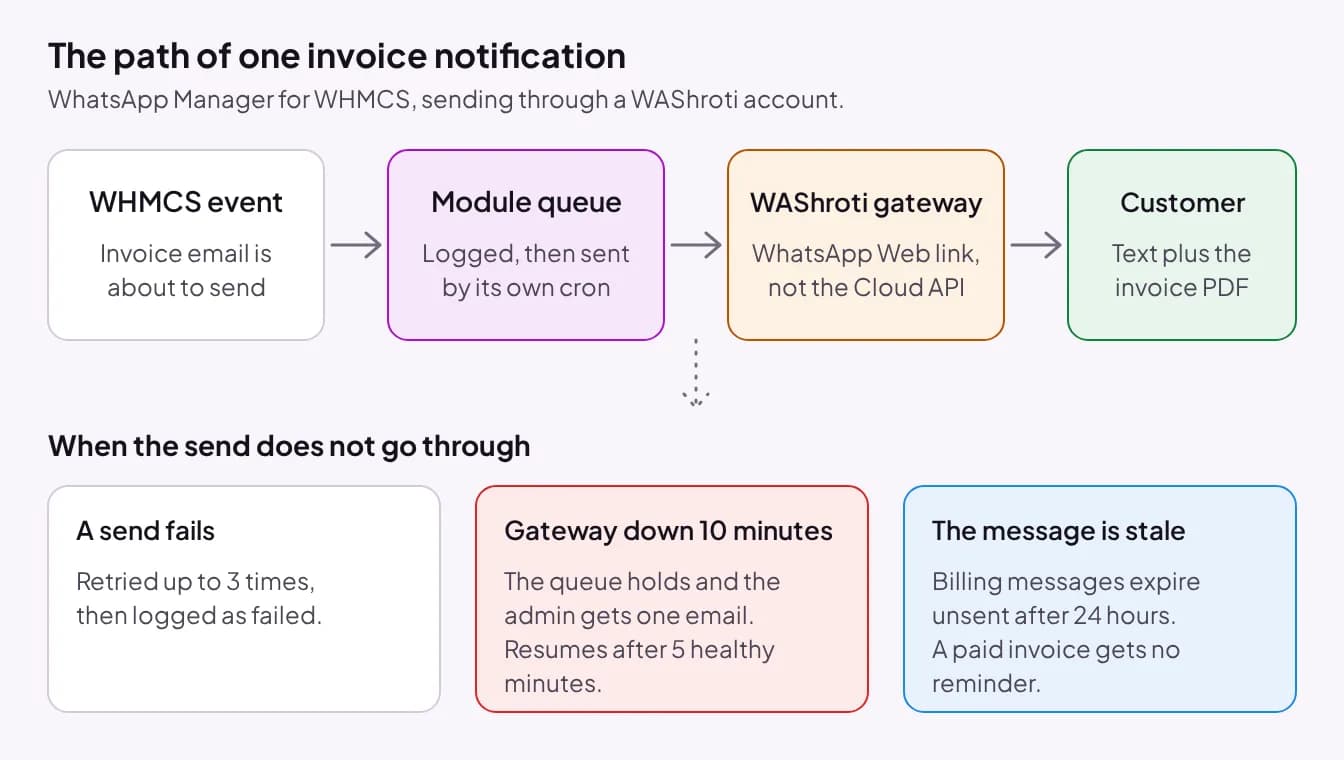
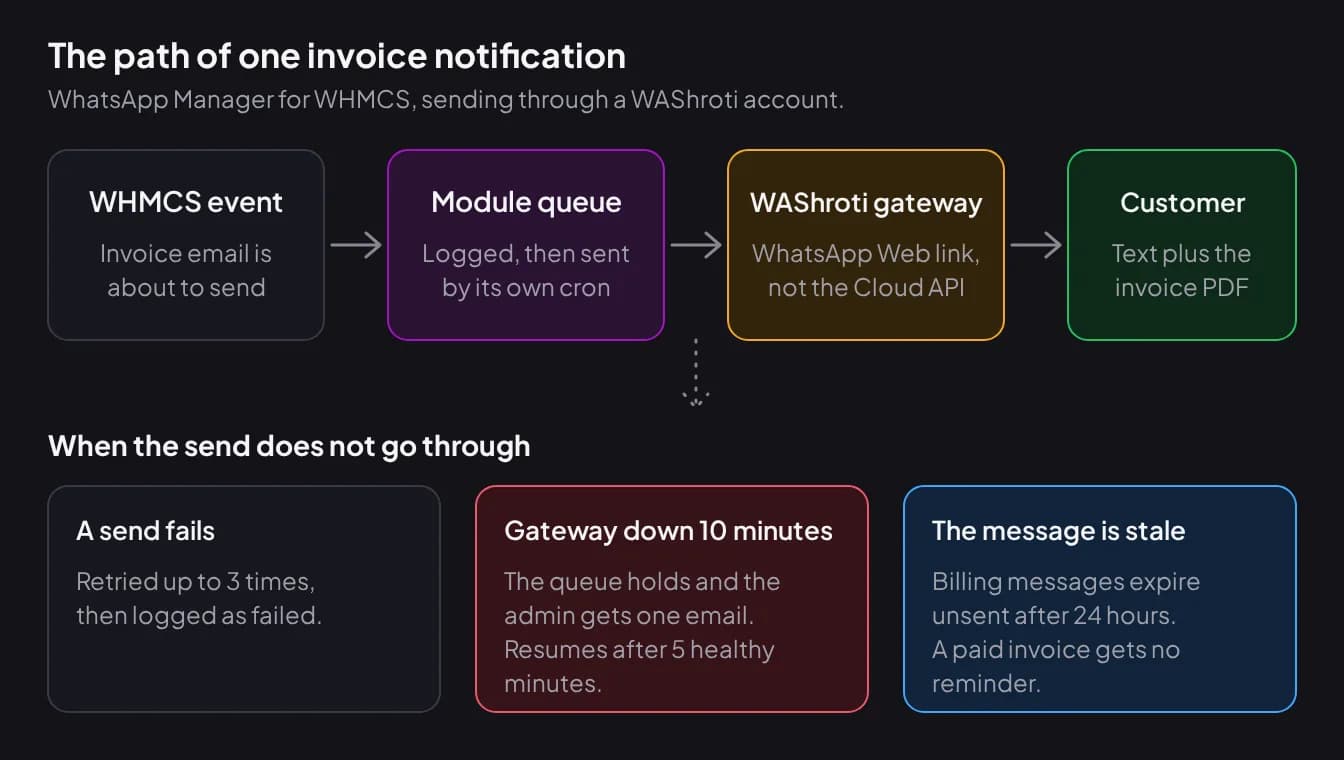
When a message cannot be sent, the module holds or drops it instead of sending it late, and an error in its hooks does not break a WHMCS page. A failed send is retried up to 3 times. If the gateway is unhealthy for 10 minutes, the queues hold, phone verification, order holds and WhatsApp login pause, and the admin gets one email. Sending resumes after 5 healthy minutes.
Messages also expire if they wait too long: codes after 10 minutes, security alerts after 30 minutes, ticket messages after 2 hours and billing, order and service messages after 24 hours. A message that is no longer true, such as a reminder for an invoice that has since been paid, is dropped.
Know the limits before you rely on it. Delivered and read receipts are not reliable on this transport, so the log shows sent, failed and expired, not confirmed delivery. The module does not handle incoming messages: there is no inbox, no auto-reply, and a client who replies STOP is not removed automatically. It also includes paced bulk campaigns. On an unofficial transport, bulk sending carries the most risk, so we suggest using it rarely and only for opted-in clients.
What do you need to run WhatsApp Manager?
You need a WHMCS installation, a WAShroti account with a WhatsApp number linked to it, and cron access on your server. The number is linked by QR code in the WAShroti dashboard, not inside the module, and the WAShroti account is separate from the module license.
- WHMCS: the release going on sale was tested against WHMCS 9.1 in a test environment, not on a live installation. WHMCS 8 has not been verified. We run an earlier release on our own billing portal.
- PHP 8.1, 8.2, 8.3 or 8.4 with the ionCube Loader, sodium and curl.
- A cron line for the module that runs every minute. It does not run on the WHMCS cron.
- A utf8mb4 database and outbound HTTPS from your server.
- One license per WHMCS installation.
Setup follows four steps after you upload and activate the addon: activate the license, paste the WAShroti App Key and Auth Key and set the admin number, send a test message, then add the cron line. The module is on sale from 1 December 2026 at ₹349 a month, ₹999 a quarter or ₹2,999 a year (excl. service fee: prices exclude the 15% Infrastructure & Service Fee, added at checkout). The WhatsApp Manager store page also lists a free trial license.
Which route should you choose?
Choose the official Cloud API if losing your WhatsApp number would hurt the business, if you send marketing messages, or if you message thousands of clients. WhatsApp Manager is not the right module for that case, because it does not support the Cloud API.
An unofficial gateway is a reasonable choice for a small host that sends a modest number of transactional messages to opted-in clients, from a dedicated number, with email still running. If you accept the risk, a module with a queue, expiry rules and sending limits is safer than a bare script. Ours is one of five WHMCS modules in the Shroti Host store.
If clients read the reminder and still pay late because paying is awkward, see how to accept UPI payments in WHMCS. If you are still setting up the business itself, read our guide to starting a hosting business in India first.
Frequently asked questions
Does WHMCS have a built-in WhatsApp integration?
No. In WHMCS 9.1, client payment reminders are sent as emails, and the Notifications feature for staff lists two providers, Slack and Email. WhatsApp needs an addon module, a custom notification module or hook written by a developer, or a middleware tool, and each of those sends through either the official Cloud API or an unofficial WhatsApp Web gateway.
Is it against WhatsApp's rules to automate messages through WhatsApp Web?
WhatsApp's Terms of Service list bulk messaging and auto-messaging as impermissible, and its help center says linking an account to unofficial versions of WhatsApp violates the terms and can lead to a temporary or permanent ban. Automated business messaging is permitted through the WhatsApp Business Platform. Read the terms yourself before choosing an unofficial gateway, and treat the number as one you could lose.
What does a WhatsApp message cost on the official Cloud API?
Meta's pricing page says it charges per delivered message, and that the rate depends on the message category (marketing, utility or authentication) and the country calling code of the recipient. We do not quote a rupee figure here because rates change. Check Meta's current rate card for India, and add any fee your provider charges on top.
Can WhatsApp Manager for WHMCS attach the invoice PDF?
Yes. Invoice messages can include the invoice as a PDF attachment, named with the invoice number and status. The message text comes from a template that uses WHMCS merge fields, and you can edit it. We suggest leaving the WHMCS invoice email switched on as well, so WhatsApp is a second copy and not the only one.
Can clients opt out of WhatsApp messages from WHMCS?
With WhatsApp Manager, the account owner can choose which WhatsApp messages to receive on a preferences page in the client area, and admins can add numbers to a do-not-message list. The module does not read incoming replies, so a client who types STOP is not removed automatically. Someone on your team has to add them to the list.
Does WhatsApp Manager use the official WhatsApp Business API?
No. It sends through a WAShroti gateway account over an unofficial WhatsApp Web transport, and Meta's Cloud API is not supported. That means no template approval and no per-message charge from Meta, and it also means WhatsApp can restrict the linked number with little or no warning. If you need the official API, choose a different module.
#whmcs#whatsapp#billing#automation
See WhatsApp Manager for WHMCS
Invoice, payment and ticket messages on WhatsApp through an unofficial WhatsApp Web gateway, with a queue, expiry rules and sending limits. On sale from 1 December 2026.