

WHMCS custom module development: types, cost and hiring
11 min read · By the Shroti Host team, founded by Priyanshu Shroti
Short answer: WHMCS custom module development means paying a developer to write an addon, provisioning, payment gateway or registrar module, or a few hooks, so WHMCS does something it cannot do as shipped. Check for an existing module first. If you build, cost follows the module type, the outside APIs it talks to, whether it handles money, and the WHMCS and PHP versions it must support.
This guide is for the owner of a hosting business that runs on WHMCS and needs it to do something it does not do today: take a local payment method, provision a product from a panel WHMCS has no module for, message customers on another channel, or feed data to another system. You do not need to read PHP to use it.
You will get the module types in plain words, a table that maps what you want to the type you need, the things that move the cost, the questions to ask a developer before you pay anyone, and the cases where the right answer is to build nothing.
What is a custom WHMCS module?
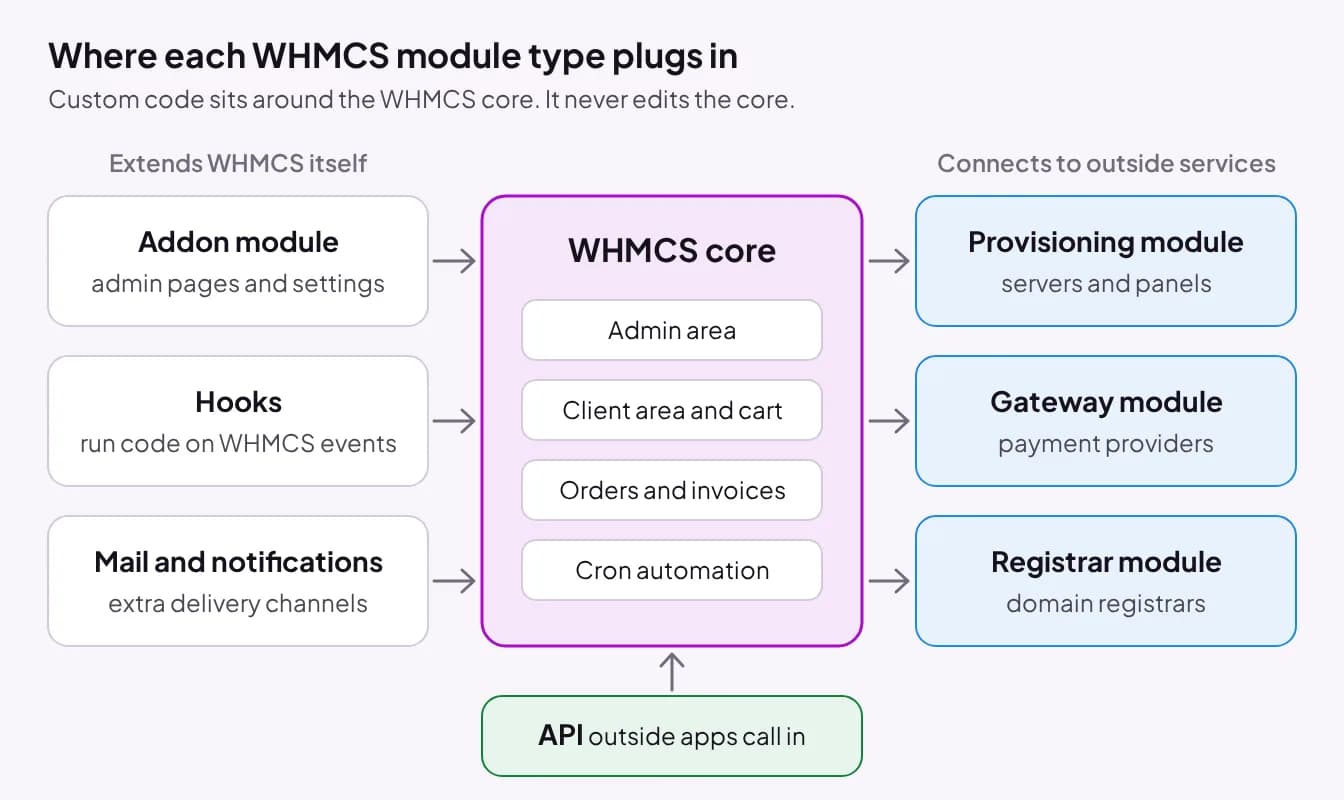
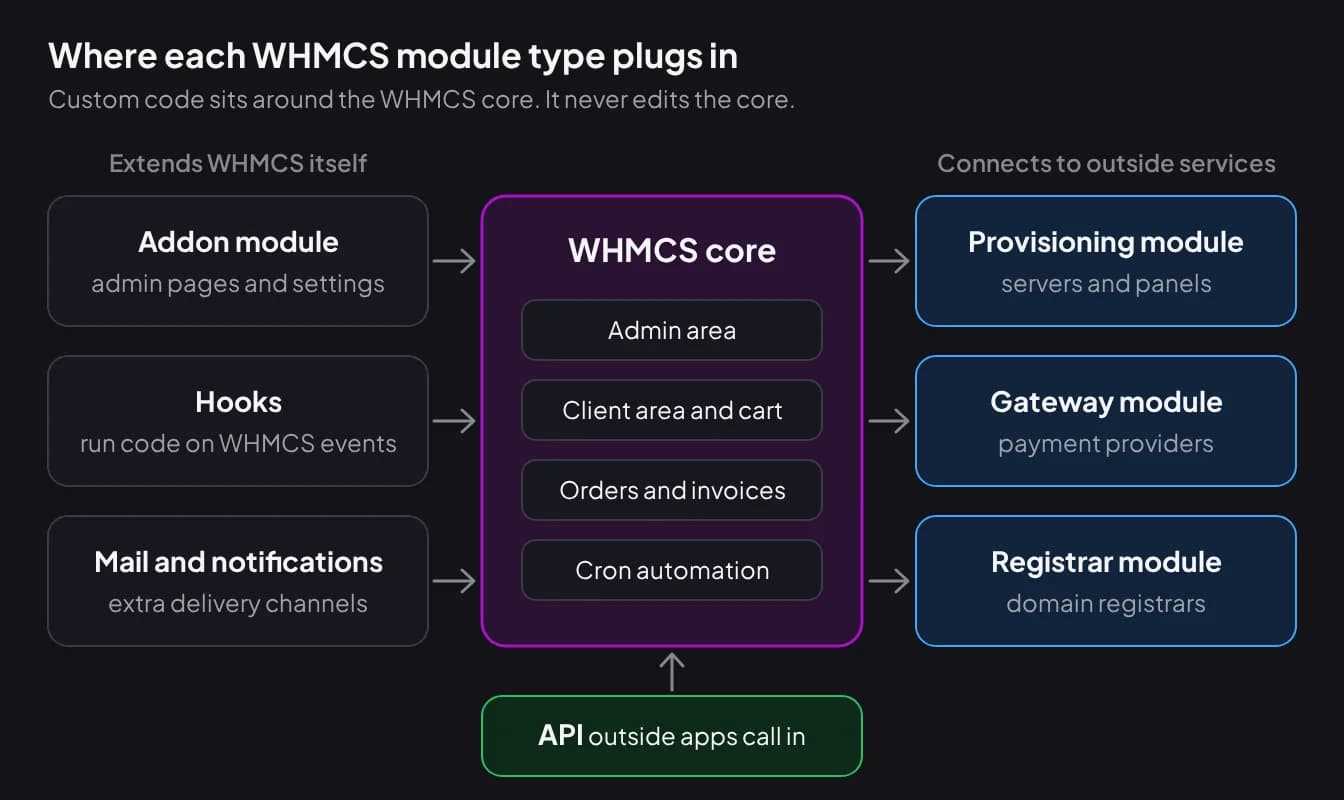
A custom WHMCS module is code written for your installation that plugs into one of the extension points WHMCS provides, without changing WHMCS itself. The WHMCS developer documentation lists six module types: provisioning, addon, registrar, gateway, mail provider and notification provider. Two more tools sit beside them: hooks and the API.
Addon modules "allow you to create both admin pages and hooks to extend WHMCS further". This is the general-purpose type: a settings screen, a report, a console for your staff.
Provisioning modules, also called product or server modules, create, suspend, unsuspend and terminate a product when WHMCS events call for it, such as an order being paid or an invoice going overdue. Gateway modules connect a payment provider. WHMCS describes three kinds: third party gateways where the customer leaves your site to pay, merchant gateways where card details are entered in WHMCS, and tokenised gateways where card details are not stored locally. Registrar modules register, transfer and renew domains, and can manage nameservers and sync expiry dates.
Hooks run your own code when an event happens inside WHMCS. They live in the /includes/hooks/ directory or inside a module. The WHMCS API works in the other direction: it lets outside code perform actions in WHMCS, which is how a separate app or script creates clients, orders or invoices.
Which WHMCS module type do you need?
The type follows from what the code has to talk to: your staff, your customers, a payment provider, a server, a registrar or another system. Many real projects combine two types. A payment gateway often ships with an addon module for its admin console, and almost every addon registers hooks.
Use the table to name what you need before you speak to a developer. It makes quotes comparable, because every developer is then pricing the same thing.
| What you want | Module type | Typical example |
|---|---|---|
| A new screen, report or settings page for staff | Addon module | A console that sets a fee rule per payment gateway |
| Something to happen when an event occurs | Hook (alone or inside an addon) | Post to your chat tool when an invoice is paid |
| Accept a payment method WHMCS lacks | Gateway module | A local wallet, bank or QR payment that marks the invoice paid |
| Create, suspend and terminate a product automatically | Provisioning module | Accounts on a control panel or a licensed software product |
| Sell domains through a registrar WHMCS does not support | Registrar module | Register, renew, transfer and update nameservers |
| Send WHMCS email or alerts through another service | Mail provider or notification provider | A transactional email service or a team chat channel |
| Let another system read or change WHMCS data | API integration | Your own signup site creating clients and orders |
When should you not build a custom module?
Do not build when an existing module, a setting or a hook of a few lines already does the job. Custom code is something you maintain for as long as you run WHMCS, so the cheapest module is the one you never commission.
Check these in order before you ask for a quote:
- WHMCS settings and built-in modules. WHMCS ships with many gateway, provisioning and registrar modules. Confirm that yours is not simply inactive.
- The WHMCS Marketplace and vendor stores. If a maintained module covers your need, buying it is nearly always cheaper than building, and someone else carries the upgrade work. Our own WHMCS module store is one such place.
- A small hook. Hiding a menu item, adding a line to a page or calling a webhook on an event is often a single short hook file. That is a small job for a competent freelancer, not a project.
- The service's own integration. Some providers publish an official WHMCS module. Use it, even if it is plain.
Build when nothing fits your gateway, market or workflow, when an existing module is abandoned or will not run on your WHMCS and PHP versions, or when the feature is part of how you compete and you want to own it.
What drives the cost of a custom WHMCS module?
Cost follows scope and risk, not the number of files. There is no honest flat price for "a WHMCS module", because a ten-line hook and a payment gateway with a review queue are both modules. These are the drivers a quote should name. If a quote names none of them, the developer has not yet thought about your project. The same logic applies to any build, as our guide to website development cost in India explains.
| Driver | Why it adds effort | Decide early |
|---|---|---|
| Scope and module type | A hook is small. Gateway and provisioning modules have many states and failure paths. | The one outcome the module must deliver |
| Third-party APIs | Each outside service needs authentication, error handling, timeouts and a plan for outages. | Which services, and whether their API is documented |
| Money handling | Code that credits invoices must never credit twice or credit the wrong invoice. | Whether the module touches payments at all |
| Admin and client-area screens | Every screen needs design, validation, permissions and testing. | Who uses it: staff, customers or both |
| WHMCS and PHP versions | Each supported version is another full test run. | The versions you run now and plan to move to |
| Security review | Client-facing input, callbacks and stored keys all need an attack-minded check. | Whether a separate review is in the quote |
| Licensing and encoding | Selling the module to others adds license checks, encoding and an update channel. | Private use or resale |
| Upgrade safety and upkeep | Code built on documented hooks and API calls survives updates better than template or database edits. | Who fixes it after a WHMCS upgrade |
What to ask a WHMCS developer before you hire
Ask for written answers to the eight questions below. They separate developers who have shipped WHMCS code into production from those who have only followed the sample module. The questions work for a freelancer, an agency or us.
- Who owns the code? You should own what you pay for. If the developer reuses a library of their own inside it, the terms for that part should be written down.
- Do I receive source code or an encoded build? Encoded files (ionCube is the common tool) cannot be read or fixed by anyone else. For a private module, ask for full source.
- Which WHMCS and PHP versions will you test on? "It should work" is not an answer. Ask for the exact versions and which of them were only assumed.
- What test evidence will I get? Automated tests, a test log or at least a written test plan with results. Ask what was not tested too.
- How is money-handling code verified? For a gateway, ask how a payment is confirmed on the server, how a repeated callback is prevented from crediting twice, and what happens to a late or wrong-amount payment.
- What happens when the outside service is down? The module should fail quietly and leave the WHMCS page working.
- Does it change WHMCS core files, templates or database tables directly? A module that stays in its own folder and uses hooks and documented functions is far easier to keep working.
- Who maintains it after a WHMCS upgrade, and on what terms? Get the maintenance arrangement and its price basis before the build starts, not after the first breakage.
How Shroti Host builds and tests its own WHMCS modules
Shroti Host builds and sells five WHMCS modules of its own, so the checklist above is the one we answer for our own products. They are WhatsApp Manager, Smart Gateway Fees and Allocator, Social Proof Premium, UPI QR Auto-Confirm and Crypto Pay, on sale from 1 December 2026. Three are addon modules built on hooks and two are payment gateways. UPI QR Auto-Confirm, for example, ships as a gateway module plus a console addon, and how to accept UPI payments in WHMCS compares it with the other routes. The module suite case study covers how they were rebuilt.
Here is what the review logs for those modules record:
- Versions: the modules run on PHP 8.1, 8.2, 8.3 or 8.4 with the ionCube Loader. They were tested against a WHMCS 9.1 emulation and the unencoded builds run on our own portal.
- Tests: the review logs record more than 220 automated tests for Smart Gateway Fees and Allocator and more than 300 across the two payment gateways, each run on PHP 8.1, 8.3 and 8.4.
- Security: each module had an independent security review. On Social Proof Premium, 0 of 32 scripted attacks succeeded against the source and the release build.
- Money: the payment modules are built and tested to credit a payment exactly once, never to the wrong invoice, and to still credit a payment already made if the license lapses. Smart Gateway Fees and Allocator applies no fee if a fee cannot be calculated, so a failure never produces a wrong charge.
- First payments: the Crypto Pay documentation tells the merchant to send a small real payment on each network before going live, and we give the same advice for any payment module, ours or anyone else's.
If you plan to sell your module to other hosts, you also need licensing. We run our own: the Shroti Host licensing platform issues Ed25519-signed license tokens, checks them from cron about once a day and never on a page load, and keeps an install working for about three weeks if the license server cannot be reached. A license check must never take down a paying customer's billing system.
How custom module pricing works at Shroti Host
Shroti Host has no price list and no starting price for custom WHMCS work. Every project is quoted on a written scope after a discovery conversation, the price is agreed before work starts, and timelines are written into that scope. Our custom software service page describes the process. The enquiry form asks you to pick a budget band: under ₹25,000, ₹25,000 to ₹75,000, ₹75,000 to ₹200,000, or over ₹200,000. Those are bands a buyer picks to start the conversation, not our prices.
You own the code, data and IP of what we build for you (our own licensed products are the exception), and you receive full source, documentation and deployment notes at launch. Care after launch (updates, fixes and new features) is optional.
We are not the right choice for everything. If you need one small hook, a freelancer is faster. If you want a developer on a monthly retainer inside your team, a dedicated-developer firm fits that model better. If one of our store modules already does the job, use it and skip custom WHMCS module development altogether.
Whoever you hire, a good brief gets a better quote. Include these points:
- Your WHMCS version, PHP version and order form or theme
- The outcome in one sentence: when X happens, Y should happen
- Every outside service involved, with a link to its API documentation
- Who uses it: staff in the admin area, customers in the client area, or both
- Whether it touches payments, invoices or credit
- Whether it is for your own use or for resale
- The versions you expect to upgrade to in the next year
Frequently asked questions
How much does a custom WHMCS module cost?
There is no standard price, because a single hook and a full payment gateway are both called modules. Cost follows the module type, the number of outside APIs, whether it handles money, how many admin and client screens it needs, the WHMCS and PHP versions to test, and whether you want it licensed for resale. Shroti Host quotes each project on a written scope and publishes no starting price.
Can one module be both an addon and a provisioning module?
Not as a single module, since each WHMCS module type has its own folder and functions. A product can ship several modules that work together, though. A payment gateway commonly comes with an addon module for its admin console, and a provisioning module can be paired with an addon for settings and logs. Ask the developer which types the quote includes.
Will a custom module survive a WHMCS upgrade?
Usually, if it was built properly. A module that lives in its own folder and uses documented hooks, module functions and API calls is not overwritten by a WHMCS update. Code that edits stock templates, reads database tables directly or depends on undocumented behavior is what tends to break. Test every custom module on a staging copy before you upgrade the live installation.
Who owns the code of a custom WHMCS module?
Whoever the contract says, so get it in writing before work starts. For custom work the normal arrangement is that the client owns the code and receives the source. At Shroti Host the client owns the code, data and IP of a custom build, with our own licensed products as the stated exception, and full source is handed over at launch.
Should a custom WHMCS module be ionCube encoded?
Only if you plan to sell it. Encoding hides the source to protect a commercial product, and every server that runs it then needs the ionCube Loader for the matching PHP version. For a module built for your own business, encoding only makes the code harder to audit and fix. Ask for readable source and keep it in your own repository.
Can a custom module connect WHMCS to a third-party service?
Yes, and it is the most common reason to build one. A hook or addon can send WHMCS events to an outside service, a gateway module can confirm payments with a provider, and the WHMCS API lets an outside system create clients, orders and invoices. The quality of the other service's API and documentation affects the effort more than WHMCS does.
#whmcs#whmcs-modules#custom-software#hiring-developers
Start a project
Tell us what you need WHMCS to do. Choose Custom Software on the enquiry form. We answer enquiries within one business day, and every build starts with a written scope and quote.