

How to accept UPI payments in WHMCS: three ways compared
12 min read · By the Shroti Host team, founded by Priyanshu Shroti


Short answer: WHMCS ships no UPI gateway. You can take UPI three ways: through a payment aggregator's WHMCS module, with a static UPI ID on the invoice and each payment recorded by hand, or with a module that shows a QR for each invoice and confirms the payment through your merchant account. Which one fits depends on your volume, your currencies and whether you need refunds inside WHMCS.
This guide is for anyone who runs WHMCS and bills customers in India: a hosting reseller, a small host, an agency. Your customers expect to pay by UPI, and WHMCS does not offer it by default.
There are three working ways to add it. Below you get how each one confirms a payment, what it costs in fees and staff time, and the stock WHMCS steps for the manual route. We make a module for the third route, and we say plainly where it is the wrong choice.
Does WHMCS support UPI out of the box?
No. WHMCS 9.1 ships no UPI gateway. The payment gateways documentation (version 9.1, read on 20 November 2026) lists the bundled modules. None is a UPI gateway, and the only Indian provider on the list is CCAvenue, with two modules. UPI has to come from a third-party module or from a manual method.
That leaves three routes. They differ mainly in one thing: who tells WHMCS that the money arrived.
- A payment aggregator's gateway module: the aggregator confirms the payment.
- A static UPI ID or QR on the invoice: you confirm it by hand.
- A QR generated for each invoice: the module confirms it by asking your merchant account provider.
Option 1: a payment aggregator's WHMCS module
An aggregator module sends the customer to a hosted checkout where UPI is one of several payment methods, and the aggregator tells WHMCS when the payment succeeds. Razorpay, PayU, Cashfree, PhonePe and CCAvenue are familiar aggregators in India. You complete the provider's merchant verification, install its WHMCS module if it offers one, and enter your API keys.
Confirmation is the strong point. The provider calls a callback file on your WHMCS, which validates the message, checks that the transaction ID has not been used before and applies the payment to the invoice. WHMCS documents that sequence in its gateway callback guide.
Verify three things before you commit. First, version support: Razorpay's WHMCS plugin page listed WHMCS 6, 7 and 8 when we read it on 20 November 2026, with no mention of WHMCS 9. Second, fees: each aggregator publishes its own pricing, and it is separate from the UPI merchant charge described further down. Third, refunds and settlement: whether a refund can be sent from the WHMCS refund screen depends on the module, and payouts follow the provider's schedule.
Option 2: a static UPI ID on the invoice, confirmed by hand
You can take UPI in stock WHMCS today with the Bank Transfer gateway, at no software cost, if you are willing to record every payment yourself. WHMCS says of this module: "When you receive payment, you must manually add the transaction to WHMCS using the Add Payment section of the invoice" (Bank Transfer documentation). The steps in WHMCS 9.1:
- Go to Configuration > Apps & Integrations and click Bank Transfer.
- Check Show on Order Form and set the display name to something like "UPI".
- In the instructions, enter your UPI ID, the payee name, and a line asking the customer to type the invoice number as the payment note.
- Save. The customer now sees those instructions on the invoice in place of a pay button.
- When money arrives, find it in your bank or UPI app records, open the invoice and use Add Payment: date, payment method, transaction ID and amount.
- If one payment covers several invoices, add a transaction at Billing > Transactions List and enter the invoice IDs separated by commas.
WHMCS notes that Bank Transfer is open source and can be duplicated on a self-hosted install, so you can keep a real bank transfer method next to a separate one named UPI. The wording can be edited later (change invoice instructions), and the manual entry itself is covered in the invoice management page. A static QR printed on the invoice template saves the customer typing the UPI ID and changes nothing about confirmation.
This route stops working as volume grows because a static UPI ID has no link to an invoice. Nothing tells WHMCS that money arrived, so a person has to match each credit to an invoice. Customers leave out the note, round the amount or pay two invoices in one transfer. A new order stays pending until someone is at a desk. A screenshot from the customer is not proof of payment: only your own bank or app record is. At a handful of invoices a month this is fine. At a few hundred it is a daily job.
Option 3: a QR for each invoice that confirms itself
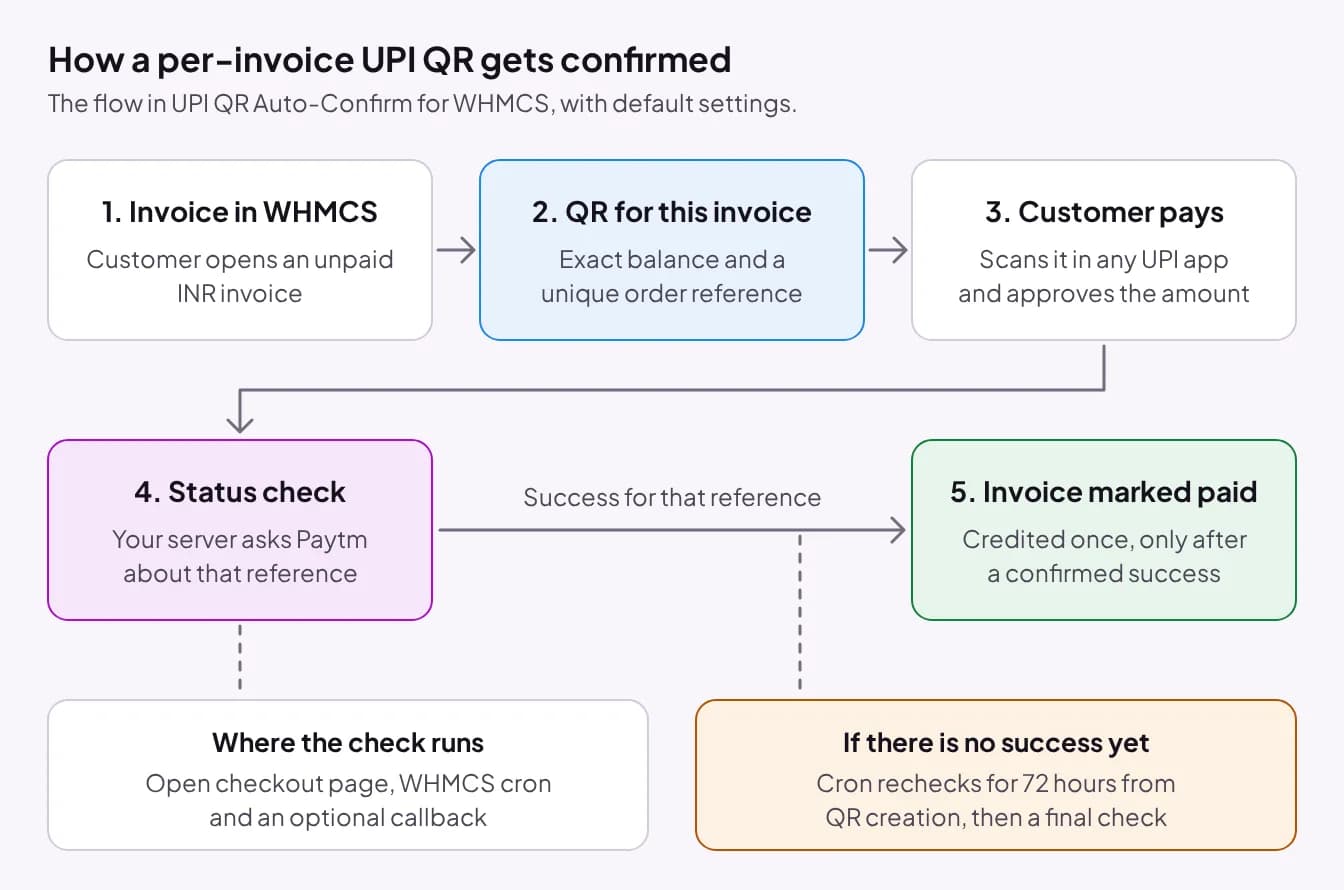
A dynamic QR module creates a new QR for each invoice, with the amount and a unique reference built in, then checks with a payment provider whether that exact reference was paid. The customer scans and approves, and the invoice is marked paid with no staff involved.
The question to ask is where the confirmation comes from. A QR reports nothing back by itself. Some party with access to your merchant account has to say that this reference was paid, so every module of this type depends on a specific merchant account or provider API. Before you install one, ask which account it needs.
Our module, UPI QR Auto-Confirm for WHMCS, works like this. It shows a UPI QR for the exact invoice balance, valid for 5 minutes by default (you can set 1 to 60), and any UPI app can scan it. Your server then asks Paytm's order-status service whether the payment succeeded, using the merchant ID of your own Paytm Business account and the order reference of that QR. Only a success for that reference counts. The customer's browser is never trusted.
The check runs from three places: the open checkout window, the WHMCS cron and an optional callback. The checkout window polls every 3 seconds for the first 2 minutes, every 5 seconds up to 10 minutes, then every 10 seconds, and continues for 15 minutes after the QR expires. If the customer pays and closes the page, the cron keeps checking for the Late Payment Window: 72 hours by default, measured from when the QR was created, adjustable from 24 to 168 hours, followed by one final check.
How do the three options compare?
The aggregator route does the most and adds the provider's fees, the static route has no software cost and leaves the matching to you, and the per-invoice QR sits between them with a narrower scope. Fees are described, not quoted, because they come from your provider's agreement.
| What you compare | Aggregator module | Static UPI ID, manual | Per-invoice QR, auto-confirmed |
|---|---|---|---|
| Setup | Merchant sign-up and verification with the provider, then its WHMCS module and API keys | Bank Transfer gateway with your UPI ID in the instructions. No extra software | A merchant account the module supports, the module itself, and the WHMCS cron |
| Fees | The provider's published pricing, plus any UPI merchant charge that applies | No software fee. Your bank's or app's terms apply | The module license, plus whatever your merchant account provider charges |
| Confirmation | Automatic, through the provider's callback | By hand, after you find the payment in your bank or app | Automatic, through a server-side status check for each QR reference |
| Refunds | Depends on the module. Check whether it can refund from WHMCS | Send the money back yourself, then record a manual refund | Outside WHMCS with our module. Record it as a manual refund |
| Reconciliation effort | Low. Payments arrive already matched to invoices | High. A person matches every payment | Low for scanned QRs. Unusual cases wait in a review queue |
What does UPI cost a merchant?
For the payer, UPI is free. For the merchant, the cost depends on the transaction size and on how the account is classified, and the rules changed in 2026. NPCI's FAQ on merchant discount rate for UPI, dated 15 September 2026, says:
- A merchant discount rate (MDR) of 0.4% applies to person-to-merchant UPI transactions above ₹2,000, capped at ₹300 per transaction for payments of ₹75,000 and above.
- The framework takes effect from 15 October 2026.
- Small merchants in the P2PM category, receiving up to ₹1 lakh a month through UPI QR into their own accounts, stay at zero MDR.
- Consumers are not charged, and merchants cannot pass MDR charges on to customers.
Treat that as the baseline. How your account is categorized, and what your bank, Paytm or aggregator adds for its own service, is in your agreement with them. Banks and apps also set their own transaction limits. Confirm both with your provider.
The last point in that list matters if you charge gateway fees. Our Smart Gateway Fees and Allocator for WHMCS can add a fee line by payment gateway, but it does not check payment-network rules for you. Do not put a fee on a UPI method without asking your payment provider or accountant. Where that module does help is allocation: showing the UPI method only to clients billed in INR.
What happens with wrong amounts, late payments, duplicates and refunds?
Each route handles these cases differently, and they decide how much support work UPI creates. With a static UPI ID they are all yours: you spot the short payment, chase the difference and return the duplicate. With an aggregator, the hosted checkout fixes the amount and the provider's rules cover the rest. For refunds made outside a gateway, WHMCS has a refund type called Manual Refund Processed Externally.
UPI QR Auto-Confirm follows fixed rules, taken from its code:
- The payer lowers the amount: recorded as a part payment.
- The payer pays more, up to twice the amount due: credited, and WHMCS keeps the excess as client credit.
- More than twice the amount, an invoice that is already paid, or a duplicate transaction ID: held in a review queue with an email to admins, never applied automatically.
- Double credit: blocked by an atomic claim and a transaction ID check before WHMCS records the payment.
- Paid straight to the UPI ID without the module's QR: not seen by the module. Record it by hand.
- Refunds, chargebacks and reversals: not handled by the module.
What UPI QR Auto-Confirm needs, and its limits
UPI QR Auto-Confirm fits only if you bill in INR, run WHMCS 9 and have a Paytm Business account. The full requirements:
- INR invoices only. Clients on other currencies are told to choose another payment method.
- A Paytm Business account with a UPI ID and a merchant ID (MID). No other bank or provider is supported.
- WHMCS 9.x. It is verified on 9.1. WHMCS 9.0 and 8.x are not verified.
- PHP 8.1, 8.2, 8.3 or 8.4 with ionCube Loader 15 or later and the curl, gd, json, mbstring and sodium extensions.
- The WHMCS cron running every 5 minutes, and outbound HTTPS to securegw.paytm.in and licensing.shrotihost.in.
- Setup in order: upload, activate the gateway, activate the console addon and grant admin roles, then complete the Setup tab (license key, payment settings, test connection).
Now the limits. Confirmation depends on a Paytm endpoint that is unsigned and not formally documented for Paytm Business QR accounts. If Paytm changes or withdraws it, automatic confirmation stops. Nothing is credited wrongly, but you are back to manual entry. The module offers a QR and the UPI ID only: no button that opens a UPI app, no collect requests and no AutoPay, so customers pay each invoice themselves. It is not made or endorsed by Paytm, NPCI or WHMCS.
On testing: an earlier release credited a real payment on our own WHMCS 9.1. The release going on sale was tested in a WHMCS 9.1 test environment and has not yet been tested with real money. Send a small real payment of your own before you rely on it.
The module is on sale from 1 December 2026 at ₹199 a month (excl. service fee) or ₹1,999 a year, or ₹5,999 one time for a lifetime license that includes one year of updates and support. Prices exclude the 15% Infrastructure & Service Fee, added at checkout. One license covers one WHMCS installation and there is no free trial. Details are on the UPI QR Auto-Confirm page.
Which option should you choose?
Choose by payment volume, by what else you need to accept, and by which merchant account you already have. The routes also combine: an aggregator for cards and clients outside India, plus a UPI method for domestic invoices. For clients abroad who ask to pay in crypto, see how to accept USDT in WHMCS.
If you are still putting billing together, our guide to starting a hosting business in India covers the rest of the setup, and the other WHMCS modules we make are listed in the module store.
- A few UPI payments a week: use the static UPI ID with manual entry. It costs nothing.
- You also need cards, netbanking, clients who pay in other currencies, or refunds from inside WHMCS: use an aggregator module, after checking that it supports your WHMCS version.
- You bill in INR, have or can open a Paytm Business account, and want invoices marked paid without staff: a per-invoice QR module fits.
- You need UPI AutoPay for recurring billing: neither QR route does it. Ask aggregators about mandates.
Frequently asked questions
Can I accept UPI in WHMCS without a payment gateway account?
Yes. Activate the Bank Transfer gateway in WHMCS, put your UPI ID and payee name in its instructions, and record each payment on the invoice with Add Payment once you see it in your bank or UPI app. It needs no extra software or provider account. Every payment has to be matched by a person, so it suits low volumes.
How does a UPI QR module know the customer has paid?
The QR reports nothing back by itself. A module has to ask a payment provider that can see your merchant account whether a specific reference was paid. UPI QR Auto-Confirm asks Paytm's order-status service from your server, using your Paytm Business merchant ID and the order reference of that QR, and credits the invoice only on a success for that reference.
Can I use a personal UPI ID, or do I need a merchant account?
For the manual route, WHMCS only displays whatever UPI ID you type, so the software does not care. Whether your bank allows business receipts on a personal account is a question for the bank. Automatic confirmation always needs a merchant account that a provider can query: UPI QR Auto-Confirm needs a Paytm Business account with a UPI ID and merchant ID.
Does the Razorpay WHMCS plugin work on WHMCS 9?
Razorpay's own WHMCS plugin documentation listed WHMCS 6, 7 and 8 as supported when we read it on 20 November 2026, and did not mention WHMCS 9. That does not prove it fails on 9, only that Razorpay had not stated support. Ask Razorpay, or test on a staging copy of your WHMCS, before you depend on it.
Are UPI payments free for merchants?
Not always. NPCI's FAQ dated 15 September 2026 describes a 0.4% merchant discount rate on person-to-merchant UPI transactions above ₹2,000, capped at ₹300 for payments of ₹75,000 and above, from 15 October 2026. Small merchants in the P2PM category stay at zero. Customers pay nothing. Your provider's own charges are separate, so confirm with them.
Does UPI work for recurring WHMCS invoices?
With a static UPI ID or a per-invoice QR, the customer pays each invoice themselves: WHMCS raises the renewal invoice and the customer scans or transfers again. UPI QR Auto-Confirm has no AutoPay or mandate support. If you need automatic recurring debits over UPI, ask payment aggregators whether their WHMCS module supports mandates.
What happens if a customer pays after the QR expires?
In UPI QR Auto-Confirm the QR is valid for 5 minutes by default, but a payment that lands later is still credited. The open checkout page keeps checking for 15 minutes after expiry, and the WHMCS cron keeps checking for 72 hours by default, counted from when the QR was created, with one final check at the end.
#whmcs#upi#payment-gateways#billing
See UPI QR Auto-Confirm for WHMCS
A UPI QR for each INR invoice, confirmed through your own Paytm Business account. On sale from 1 December 2026, from ₹199 a month excl. service fee.