

Social proof for WHMCS stores: real orders, never fake ones
11 min read · By the Shroti Host team, founded by Priyanshu Shroti
Short answer: WHMCS has no built-in social proof, so you add it yourself: a link to real reviews on an independent platform, recent-order notifications built from real paid orders, numbers you can back up, clear refund and renewal terms, and visible support channels. Never show invented purchases. India's 2023 dark pattern guidelines list "showing false popularity" under false urgency.
This guide is for a hosting company or reseller that sells through WHMCS and wants the order pages to look as trustworthy as the business behind them.
It covers five kinds of proof a hosting store can show honestly, how to add each in WHMCS, where each belongs on the order path, what two regulators' texts say about fake purchase notifications, and how to measure the result. We make a WHMCS module for one of the five and say where it does not fit.
Does WHMCS have built-in social proof?
No. WHMCS has no review widget, no recent-order display and no customer counter. It gives you places to put your own content and the data to build from.
Each product group has a headline, a tagline and a list of group features that some order form templates display (see the WHMCS product group documentation). For anything else, a developer can add HTML with the WHMCS output hooks, which cover the view cart page, the checkout page and client area pages.
A recent-order feed can be built by hand from the GetOrders API, which returns orders with their date and payment status. If you go that way, do the work on the server and publish only the fields you mean to show. Never expose raw order data to the browser.
What social proof makes sense for a hosting store?
Five kinds of proof suit a hosting store, because each answers a question a buyer has before paying: who else uses this host, whether it is still active, what happens after a change of mind, what next year costs, and who to contact when something breaks.
The last two rows are not about other customers, and they belong here anyway: a written refund window and a visible support channel are things a buyer can hold you to. On our own hosting pages we state a 7-day money-back guarantee on a first purchase of web hosting, list what it excludes (VPS, domains and renewals are not refundable), and say that hosting renews at the advertised price. Our post on hosting renewal prices in India explains why that last line matters to buyers.
| Kind of proof | What makes it honest | How to add it in WHMCS |
|---|---|---|
| Reviews on an independent platform | The reader can open the profile and see every review, good and bad. | Link to the profile from your order form template or a footer hook. Quote reviews as written. |
| Recent-order notifications | Every notification comes from an order that was placed and paid for, with its real age. | Build a feed from GetOrders, or use a module such as Social Proof Premium for WHMCS in its default real-orders mode. |
| Numbers you can back up | The figure comes from your own records and carries a date. | Take active client and service counts from your WHMCS admin area and put them, dated, in the product group tagline or features. |
| Refund and renewal terms | The window, the exclusions and the renewal price are stated before payment, in plain words. | Product descriptions, group features, and a line on the cart and checkout pages through the output hooks. |
| Visible support channels | The channels listed are the ones you really answer, with no reply time you cannot keep. | A header or footer hook across the cart and client area. |
Where should each kind of proof go on the WHMCS order path?
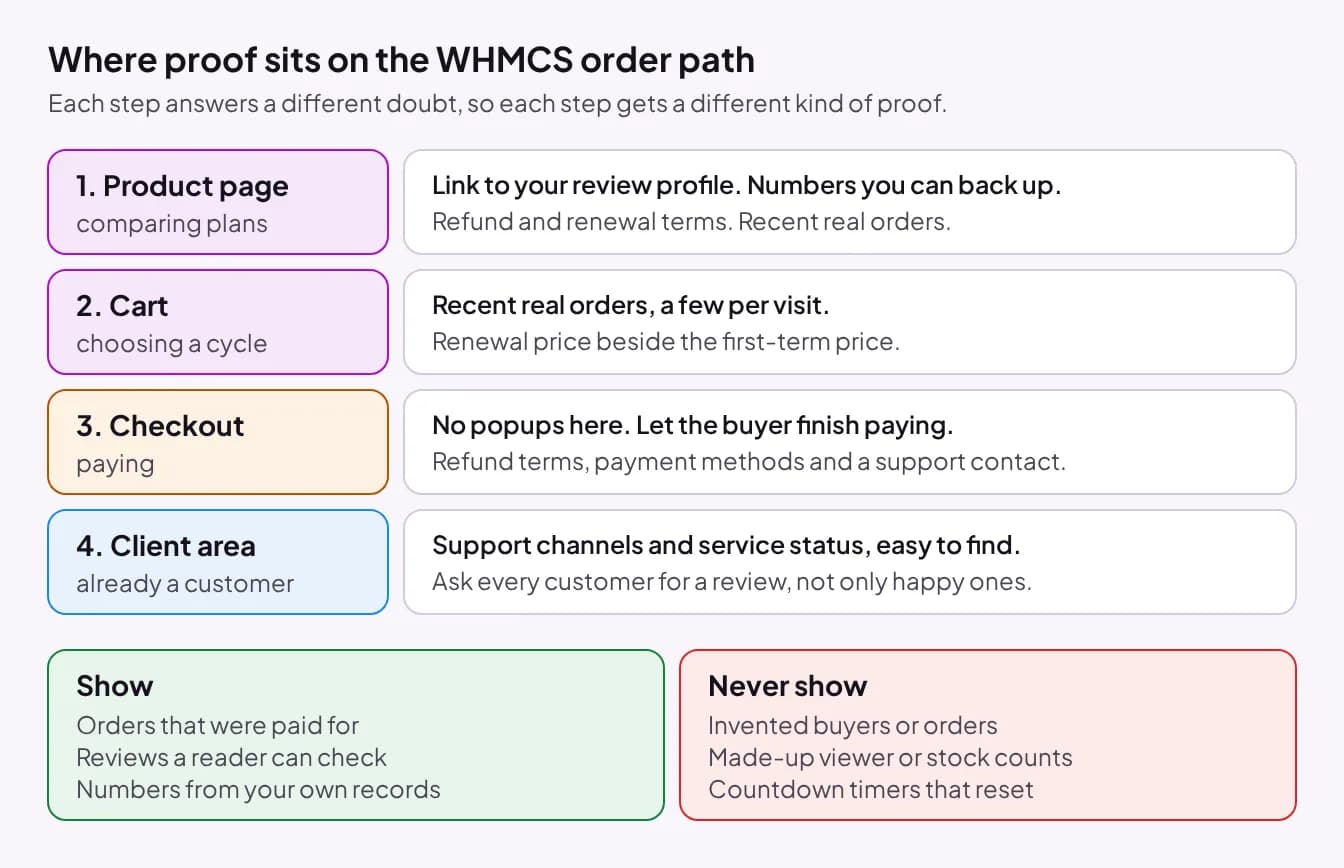
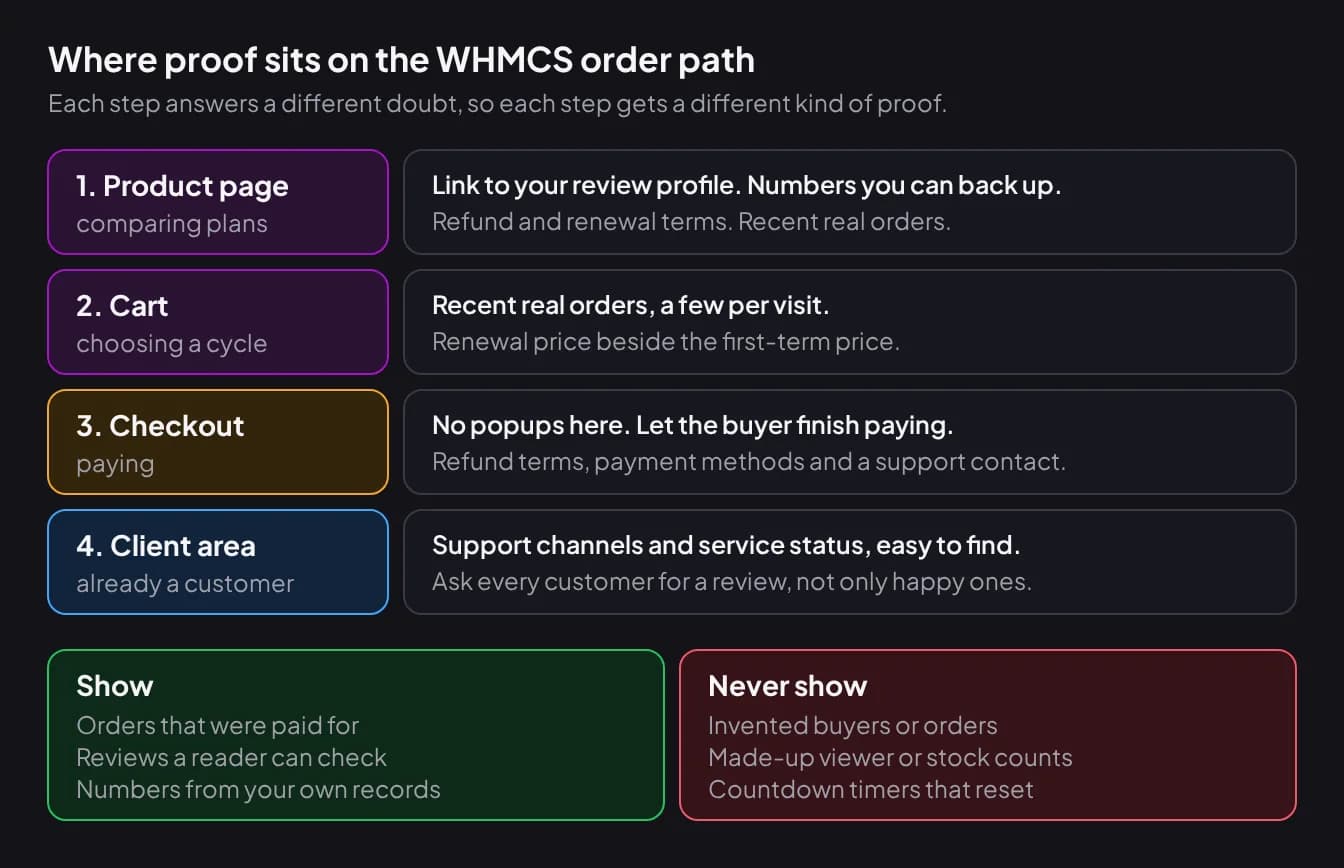
Put each kind of proof at the step where its question comes up: reviews and numbers on the product page, recent orders and renewal prices in the cart, terms and support contact at checkout, and support channels in the client area.
On the product page the visitor is still comparing hosts, so the review link, a dated customer count and recent-order notifications go here. In the cart the visitor is choosing a billing cycle, so put the renewal price beside the first-term price.
At checkout the buyer is entering payment details, so anything that moves is a distraction. Keep popups off this page and show refund terms, payment methods and one support contact as still text.
In the client area, proof means keeping promises visible: how to open a ticket, where service status is posted, and what the next renewal costs. It is also the place to ask for a review. Ask every customer, not only the happy ones, and check your review platform's rules on invitations.
Are fake purchase notifications allowed?
Regulators treat false claims about what other buyers are doing as a dark pattern. We read both texts below, and this section states only what they say.
India. The Central Consumer Protection Authority notified the Guidelines for Prevention and Regulation of Dark Patterns, 2023 on 30 November 2023 under section 18 of the Consumer Protection Act, 2019. They apply to "all platforms, systematically offering goods or services in India", to advertisers and to sellers, and they say: "No person, including any platform, shall engage in any dark pattern practice." The first pattern in Annexure 1 is "False Urgency", defined as "falsely stating or implying the sense of urgency or scarcity so as to mislead a user into making an immediate purchase". It includes "showing false popularity of a product or service to manipulate user decision". The annexure adds that its illustrations are guidance and not a binding interpretation of the law.
United States. The Federal Trade Commission's staff report Bringing Dark Patterns to Light (September 2022) lists, among deceptive patterns raised at its workshop, "false claims that other people are also currently looking at or have recently purchased the same product". Its appendix files "False Activity Messages" under endorsements, also called social proof, and describes them as "making false claims about others' activity on a site or interest in a product". It is a staff report, not a rule of its own.
A popup that says someone bought a plan when nobody did is a false statement about other buyers. Our position follows from that: show real orders only. We are not lawyers and this is not legal advice. Read the texts and ask your own adviser before you show anything simulated.
Real proof vs fake proof: where is the line?
The line is whether the thing you show happened. Real proof reports an event from your records, and fake proof invents one. The test: could you show a customer or a regulator the record behind what the page displayed?
| Element | Real | Fake |
|---|---|---|
| Order popup | A paid order from the last few days, shown with its true age | A generated name, country and product that no one bought |
| Review | Quoted as written, linked to a public profile | Written by staff, or edited until it says something new |
| Demand message | None, unless you can measure it | "12 people are viewing this plan" from a random number |
| Deadline | An offer with a fixed, published end date | A countdown that restarts for every visitor |
What should a recent-order popup show and hide?
A recent-order popup should show as little about the buyer as it can while still being true: the product, the country and how long ago. It should hide anything that could identify a person.
- Name: use an initial or a neutral label such as "A customer".
- Location and money: country only, and no price or order value.
- Age: the real age of the order ("3 days ago"), never a fake "just now".
- Frequency: a few per visit with gaps of several seconds.
- Control: the visitor can dismiss it, it pauses while they read it, and it respects the reduced-motion setting on their device.
- Placement: off the checkout, payment and invoice pages.
Showing any customer detail in public is also a privacy question. We did not research privacy law for this post, so check the rules that apply to your business.
How does Social Proof Premium for WHMCS handle this?
Social Proof Premium for WHMCS is our addon for recent-order notifications: small popups on the storefront, built from real paid orders by default. A new install starts with popups off and the mode set to real orders only.
In that mode an order qualifies only if the service is active or completed, the client is active, the order invoice is paid (or the order was free), the product is not hidden or retired, and the order is within the age you set (7 days by default, 1 to 90). Each real order is checked again before display. A popup shows a first name, an initial or "A customer" (your choice), the country, the product name and an age such as "Today" or "3 days ago". An optional "Verified order" tick appears on real orders only.
The module also has an admin option to add simulated rows and mix them with real orders, or to show simulated rows alone. We recommend leaving it off. Simulated rows are invented activity, the texts quoted above name false popularity and false activity messages as dark patterns, and a customer who learns the popups were made up has a reason to doubt the rest of the page. The module's own documentation tells admins to check local consumer protection rules before using it.
Popups pause on hover or keyboard focus, the Escape key dismisses them for the session, and there is a phone layout, dark mode and reduced-motion support. They do not appear on checkout, invoice, payment, quote or ticket-submit pages. The default is 5 popups per visit, 7 to 25 seconds apart, with sound off. If anything fails, the page loads with no popup.
- Limits: it reads hosting products and services only, so domain and product addon orders never appear.
- Freshness: orders come from a cache refreshed about every 10 minutes, so a new order appears after a short delay.
- Not included: no city, no order value, no visitor counts, no countdown timers, no built-in analytics.
- Requirements: WHMCS 9.x (8.x is untested), PHP 8.1 to 8.4, ionCube Loader, the sodium and curl extensions, and the WHMCS cron running at least daily. Popups show only on the licensed domain.
- Price: ₹499 per quarter or ₹1,499 per year, excl. service fee. There is no monthly plan and no trial. It is on sale from 1 December 2026, alongside the other modules in our WHMCS module store.
What can a new store with few orders show?
A new store should show the proof that does not depend on volume and let order proof arrive with the orders. An empty feed is better than an invented one.
Terms and support can go up on day one: the refund window, the renewal price, the ways to reach you, and a registered business name and address a buyer can check. Add the review profile link when the first review exists. With a few orders a month, a longer window keeps real orders visible: set the maximum order age to 30 or 60 days and the popup shows an older order with its true age.
How do you measure whether social proof helps?
Compare order conversion before and after the change, over equal periods long enough that a handful of orders cannot swing the result. We publish no uplift figure because we have no verified one.
- Pick one measure: paid orders divided by visits to the cart, for new customers only. Take paid orders from WHMCS and cart visits from your web analytics.
- Record a baseline for at least four full weeks before you change anything.
- Change one thing at a time. Popups and a discount in the same week cannot be told apart.
- Run the new version for the same number of weeks, avoiding a sale or price change the baseline did not have.
- Judge the gap against your volume. At 20 orders a month, three more orders can be chance. Extend the test until the difference holds for several weeks.
- Watch refund requests and complaints about the popups. If orders are flat and visitors are annoyed, turn it off.
A before-and-after comparison is weaker than a split test because other things change between the periods, and "no clear difference" is a valid result. Once orders arrive, the next job is getting invoices paid, which our guide to WHMCS notifications on WhatsApp covers.
Frequently asked questions
Is there a WHMCS module that shows recent sales?
Yes, though WHMCS itself has no such feature. Before buying any recent-sales module, check its last update date and the WHMCS versions it supports. Social Proof Premium for WHMCS, made by Shroti Host, shows recent paid orders on WHMCS 9.x and is on sale from 1 December 2026. A developer can also build a feed from the GetOrders API.
Is it legal to show fake or dummy sales notifications in India?
India's Guidelines for Prevention and Regulation of Dark Patterns, 2023 prohibit dark pattern practices and list "showing false popularity of a product or service to manipulate user decision" under false urgency. We are not lawyers and cannot tell you how the authority would treat a specific popup. Our advice is to show real orders only and to ask your own legal adviser before displaying anything simulated.
What customer details are safe to show in a sales popup?
Show the least you can: the product, the country and how long ago the order was placed. Use an initial or "A customer" in place of a name, and never show a city, an email address, a domain name or the order value. Privacy law differs by country, so check the rules that apply to your business and describe the display in your privacy policy.
Do sales popups slow down the WHMCS cart?
They can if they are built carelessly, for example by querying orders on every page view. Social Proof Premium is designed to avoid that: the order list is cached for about 10 minutes, the script loads asynchronously, and no license check runs during a page view. We have not published a speed benchmark, so test your own cart before and after installing any popup module.
Can recent-order popups show domain registrations or addon orders?
Not with Social Proof Premium. It reads WHMCS hosting products and services only, so domain registrations and product addon orders never appear in its popups. If most of your sales are domains, a recent-order popup built on this module will look quieter than your store really is, and a custom feed built from the GetOrders API may suit you better.
Does social proof increase hosting sales?
It depends on the store, and nobody can honestly promise a figure in advance. Proof that answers a real doubt, such as clear refund terms or a public review profile, gives a buyer a reason to trust you. Whether that shows up in orders is something to measure: compare paid orders per cart visit for equal periods before and after the change.
#whmcs#social-proof#whmcs-modules#hosting-business
See Social Proof Premium for WHMCS
Recent-order popups for your WHMCS storefront, built from real paid orders by default. ₹499 per quarter or ₹1,499 per year, excl. service fee. On sale from 1 December 2026.