

WHMCS payment gateway fees: how to lower what gateways cost
12 min read · By the Shroti Host team, founded by Priyanshu Shroti


Short answer: Stock WHMCS has no setting that adds a fee or a discount by payment gateway. It can limit gateways per product group and convert currencies for processing. To lower gateway costs you steer customers to cheaper methods, show gateways by country or currency, or add a fee or discount line with a hook or a module, after checking your merchant agreement.
This guide is for people who run a hosting or reseller business on WHMCS and have noticed how much of each small invoice stays with the payment gateway. It covers where to find the rate you really pay, what WHMCS can do without add-ons (checked against the WHMCS 9.1 documentation on 20 November 2026), the four ways to lower the cost, and the rules you need to check before you add any charge to a customer's invoice.
This is not legal or accounting advice. Where a rule decides the answer, we link the source.
What do payment gateways charge, and where is your real rate?
Most gateways charge a percentage of each successful payment, and the percentage changes with the payment method, the card's country and whether a currency is converted. The published rate is only a starting point. Your real rate is what your settlement reports show: total fees (including taxes on the fee, fixed per-payment charges and conversion charges) divided by the total you collected, worked out per payment method.
The table shows what two providers publish for Indian businesses, as we read their pricing pages on 20 November 2026. Rates change and negotiated accounts differ, so read the pages yourself.
WHMCS can hold the fee per payment for your own books. Each transaction has a Fees field, described in the docs as "the amount for any fees that the gateway charged for this transaction", and you can see transactions at Billing > Transactions List (WHMCS transactions documentation). Whether that field is filled in automatically depends on the gateway module. It records a cost. It does not charge the customer anything.
| Provider page | Payment method | Published rate |
|---|---|---|
| Stripe India pricing | Mastercard and Visa cards issued in India | 2% |
| Stripe India pricing | Mastercard and Visa cards issued outside India | 3%, plus 2% if currency conversion is required |
| Razorpay pricing | Standard UPI | Zero merchant discount rate, but "a standard platform or technology fee of 2% will be applied" |
How much does a percentage fee take from a low-priced hosting plan?
A gateway fee is a percentage of the price, but you pay it out of your margin, so on a low-priced plan it takes a much larger share of your profit than the headline rate suggests. Every number in the example below is chosen for easy arithmetic. None is a real rate or a real plan.
Say a host sells a plan at ₹99 a month and spends ₹79 on the server, licenses and support for that account. The margin is ₹20. A 2% fee is ₹1.98, which sounds small and is about a tenth of the margin. A 5% fee, for example an international card with currency conversion, is ₹4.95, about a quarter of the margin.
If a method costs you nothing in percentage fees and you give the customer 1% off for using it, you still keep more than you would on either card payment. The example leaves out taxes on the gateway's fee, fixed per-payment charges and dispute fees. Each of them widens the gap on small invoices.
| Payment method (example rate) | Customer pays | Gateway fee | Margin left | Share of margin lost |
|---|---|---|---|---|
| International card, 5% | ₹99.00 | ₹4.95 | ₹15.05 | About 25% |
| Domestic card, 2% | ₹99.00 | ₹1.98 | ₹18.02 | About 10% |
| Low-fee method, 0% | ₹99.00 | ₹0.00 | ₹20.00 | 0% |
| Low-fee method, 0%, with a 1% discount | ₹98.01 | ₹0.00 | ₹19.01 | About 5% |
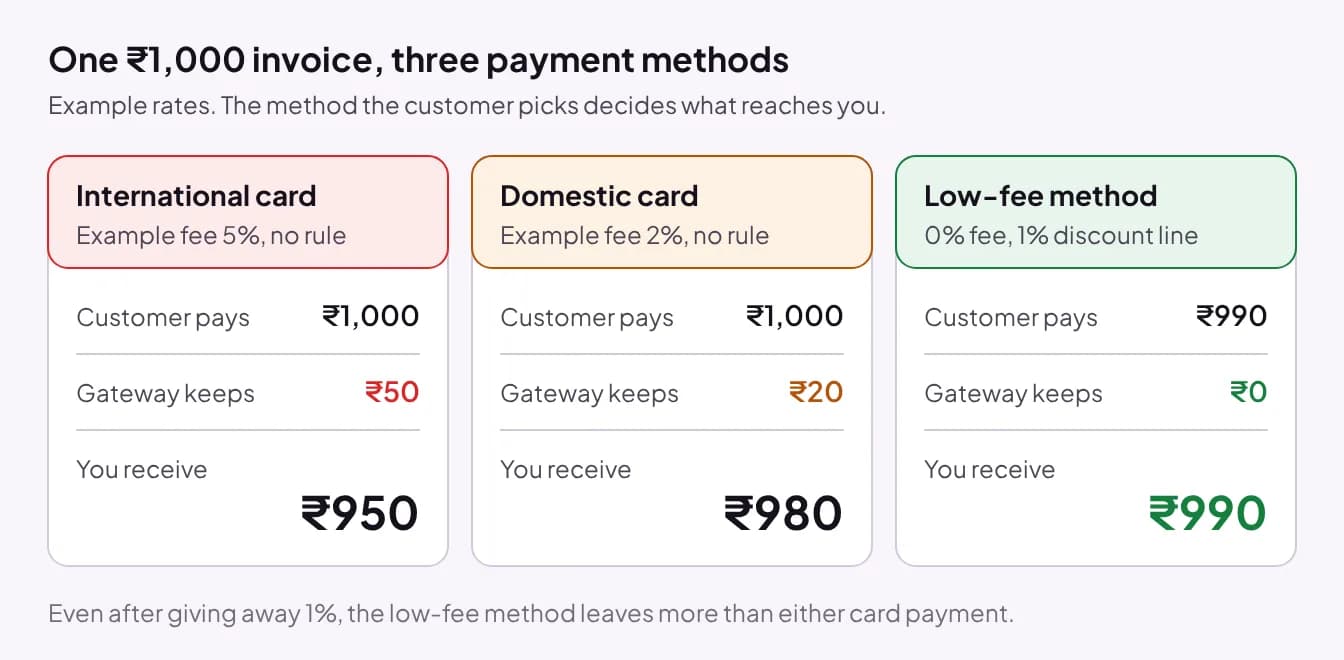
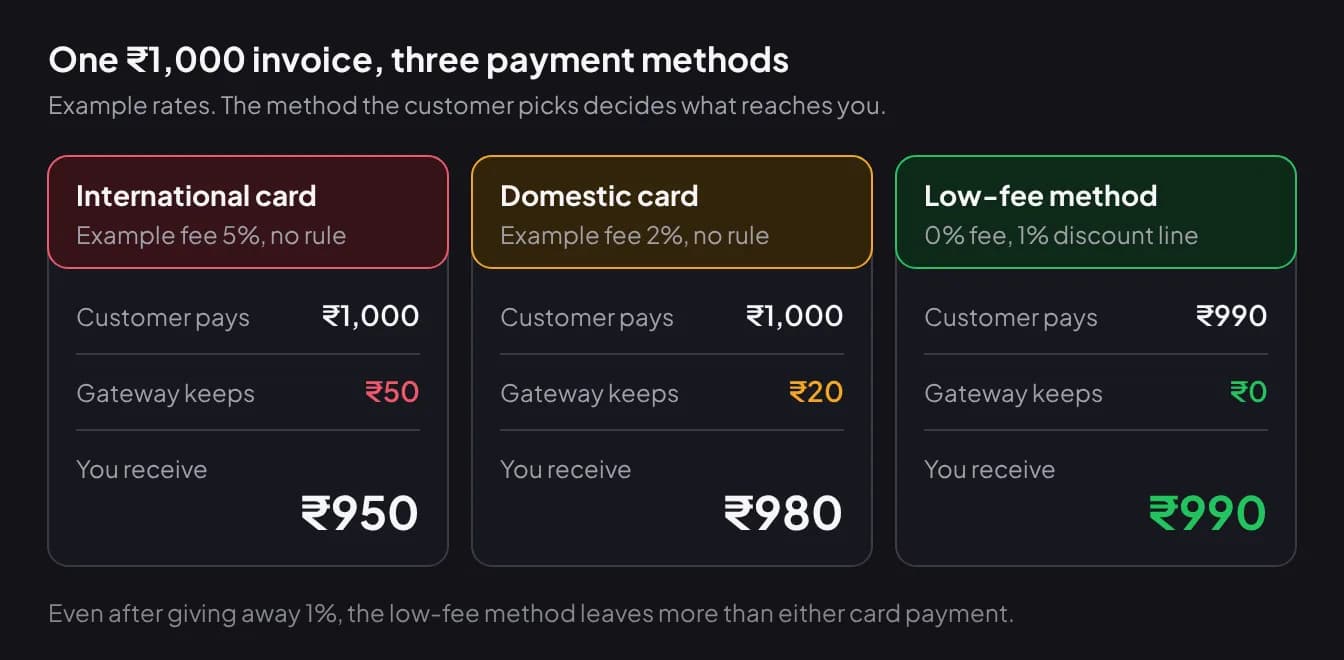
Can WHMCS add a gateway fee or discount by itself?
No. WHMCS 9.1 has no built-in setting that changes the invoice total by payment gateway. The payment gateways documentation lists three settings that every gateway shares: Show on Order Form, Display Name and Convert To For Processing. A feature request to set pricing by payment gateway was posted 13 years ago and had 250 votes when we checked.
What stock WHMCS can do is narrower:
- Limit gateways per product group. Go to Configuration > System Settings > Products/Services, edit the group and set Available Payment Gateways. The product groups documentation warns that an order with items from several groups shows only the gateways those groups share, and that if they share none, "no payment gateways will be available for payment".
- Convert the amount for a gateway that only accepts one currency, with Convert To For Processing. This lets a customer pay through that gateway. It does not hide the gateway from anyone.
- Group items due on the same date, with the same payment method, into one invoice. The invoice configuration documentation says of this: "This reduces your transaction fees." It helps most when your gateway charges a fixed amount per payment.
A developer can go further with hooks. The WHMCS hooks reference lists InvoiceCreation and InvoiceChangeGateway, which is where a custom fee line would be added and then corrected when the customer switches method. Plan for one complication: by default, WHMCS invoices "become immutable after they leave the Draft status" (invoice management documentation), so code that edits a published invoice has to work with that setting.
What are the options for lowering gateway costs in WHMCS?
There are four, and they can be combined: steer customers to cheaper methods, show or hide gateways by country or currency, add a convenience fee line, or give a discount for a cheaper method. The first costs nothing and needs no permission. The third needs the most care. Stock WHMCS handles the first and a small part of the second. Country and currency rules and both kinds of invoice line need custom code or an addon such as our gateway fees and allocator module.
Steering works without changing a price. The order of gateways at checkout, a plain Display Name ("UPI" instead of a provider's brand) and one sentence on the invoice about the preferred method all move customers toward it. For Indian customers a direct UPI method can be the cheap one, and we compare the three ways to accept UPI in WHMCS separately. Our UPI QR Auto-Confirm for WHMCS shows a QR for the exact invoice balance and credits the invoice after confirming the payment with Paytm for your own Paytm Business account. It works for INR invoices only, needs a Paytm Business account, and what that account costs you is set by your Paytm Business terms, so read them before you count it as free.
| Option | In stock WHMCS | Watch out for |
|---|---|---|
| Steer to cheaper methods | Yes: gateway order, Display Name, invoice wording | Customers who can only pay by card still need a card option |
| Show or hide gateways by country or currency | Only per product group. No country or currency rule | A customer left with no gateway cannot pay at all |
| Convenience fee line on costly methods | No. Needs a hook or a module | Card network rules, your merchant agreement and local law |
| Discount line on cheap methods | No. Needs a hook or a module | The discount comes out of your margin, so set it below the fee you avoid |
Are you allowed to add a surcharge or convenience fee?
It depends on three things that no WHMCS setting or module checks for you: the card network's rules, your agreement with the acquirer or payment aggregator, and the law where you and your customer are. Here is what the primary sources we read say.
India, debit cards. The Reserve Bank of India's discussion paper on charges in payment systems (17 August 2022) says RBI "had earlier advised banks to ensure that merchants on-boarded by them do not pass on MDR charges to customers while accepting payments through debit cards", and that the same "has not been mandated for transactions performed using credit cards and PPIs". The paper also says surcharges and convenience fees charged by merchants are commercial activity and "are not regulated by RBI" directly.
India, UPI and RuPay debit. The same paper records that the government made the merchant discount rate "for RuPay debit cards (and UPI) zero, effective January 1, 2020". That has since changed. NPCI's FAQ on merchant discount rate for UPI, dated 15 September 2026, describes a 0.4% rate on person-to-merchant UPI transactions above ₹2,000 from 15 October 2026, and says merchants "cannot pass on MDR charges to customers while accepting payments through UPI". Confirm how it applies to your account with your provider. We would not put a fee line on a UPI payment.
Aggregator convenience fees. Razorpay documents a Convenience Fee model and limits it: it is "supported for specific business cases only", "INR is the only supported currency" and it is not available for international payments. So the feature exists at one large aggregator, and you have to ask for it.
Card networks. Networks publish their own conditions and they differ by region. As one example, Visa's page for US merchants says "Merchants must notify their acquirer 30 days before they begin surcharging." Other regions have other rules, so ask your acquirer which apply to you.
An observation, not legal advice: a discount for a cheaper method is generally the safer framing. The listed price stays the most anyone pays and no customer is charged extra for a choice of instrument. It can still be covered by your agreement or local law, so check it the same way.
Why does adding 2% not recover a 2% fee?
Because the gateway charges its percentage on the new, larger total, fee line included. On a ₹1,000 invoice with an example 2% rate, a 2% fee line makes the customer pay ₹1,020. The gateway keeps 2% of ₹1,020, which is ₹20.40, and you receive ₹999.60.
To receive the full ₹1,000 you divide instead of multiply: ₹1,000 / (1 - 0.02) = ₹1,020.41. This is called grossing up. The gap grows with the rate and the invoice size. Whether the fee line itself is taxed is a question for your accountant.
What does Smart Gateway Fees and Allocator do, and what are its limits?
Smart Gateway Fees and Allocator for WHMCS is our addon that adds one fee or discount line to an invoice by payment gateway and controls which gateways each client can use. It is on sale from 1 December 2026 at ₹199 a month, ₹499 a quarter or ₹1,999 a year (excl. service fee), with one license per WHMCS installation.
- Amounts: fixed, percentage or both, with a minimum, a maximum, tiers by invoice value and two gross-up models.
- Fee rules can match on gateway, client, client group, country, currency, billing cycle, invoice type, renewal, promo code, tax state and amount range. All conditions in a rule must match.
- Gateway visibility rules work by country, currency, client group, order amount, and by products, product groups, addons and domain extensions. There is no billing-cycle rule for visibility. The rules are enforced on the server when the order is placed and on the invoice page.
- One line per invoice, updated in place. It follows the customer if they change gateway on an unpaid invoice. Only Unpaid and Draft invoices change, never one with a payment recorded.
- Credit balance: an order paid fully from credit gets no gateway fee and no gateway discount. With part credit, the rule applies only to the part paid through the gateway.
- You choose whether the line is taxed under your WHMCS tax settings, and customers see the fee or discount in the order summary before they order.
The limits matter as much as the features. The module does not know your card network rules or your merchant agreement: it will apply whatever you configure, so the permission check above is yours to do. It is built for WHMCS 8.x and 9.x. Our tests ran in a WHMCS 9.1 test environment and it runs on our own portal; WHMCS 8.x is untested, so try it on a staging copy first if you are on 8.x. It needs PHP 8.1 to 8.4 with the ionCube Loader, the sodium and curl extensions, the WHMCS cron and outbound HTTPS to our licensing server. Orders created by an admin or through the API are not verified to receive a fee, and heavily customized order forms may need a small anchor for the checkout preview. If a fee cannot be calculated, the invoice is left without one and stays payable.
Which option should you pick?
Start with the free steps and add an invoice line only when the numbers and the rules both support it. In order:
- Work out your real rate per payment method from your settlement reports.
- Reorder and rename gateways so the cheapest method that suits each customer comes first.
- Use product-group limits where they are enough, and test a mixed cart so nobody is left without a gateway.
- If one method is clearly cheaper, consider a discount on it that is smaller than the fee you avoid.
- Consider a convenience fee line only after your acquirer or aggregator confirms, in writing, that your account may charge one on that method.
You do not need our module if product-group limits already give each customer the right gateways, or if you only want to track fees for your books. If you need a rule that no module covers, a developer can write the hook: see our guide to WHMCS custom module development. Our studio takes on custom WHMCS module work. The rest of our modules are listed in the module store, and if you are still planning the business itself, read how to start a hosting business in India first.
Frequently asked questions
Does WHMCS have a built-in payment gateway fee setting?
No. The WHMCS 9.1 documentation lists Show on Order Form, Display Name and Convert To For Processing as the settings every gateway shares, and none of them changes the invoice total. A feature request for pricing by payment gateway was posted 13 years ago. Adding a fee or discount line needs a custom hook or an addon module.
Can I show different payment gateways by country in WHMCS?
Not in stock WHMCS. The only built-in restriction is Available Payment Gateways on a product group, which applies to every customer who orders from that group whatever their country or currency. Showing gateways by client country, currency, client group or order amount needs an addon such as Smart Gateway Fees and Allocator or custom code.
Is it legal to pass payment gateway fees to customers in India?
It depends on the instrument and on your merchant agreement. RBI's 2022 discussion paper says banks were advised to ensure merchants do not pass merchant discount rate charges to customers on debit card payments, and that this was not mandated for credit cards and prepaid instruments. Check your acquirer or aggregator agreement and take professional advice before charging any fee.
Is a discount for UPI or bank transfer better than a card surcharge?
Often, yes. A discount keeps the listed price as the most any customer pays, so nobody is charged extra for choosing a card, and it is generally the safer framing under card network rules. It also costs you margin, so keep the discount smaller than the fee you avoid. Your merchant agreement can still cover discounts, so check it.
What happens to a gateway fee when an invoice is paid from credit?
With Smart Gateway Fees and Allocator, an order paid fully from the client's credit balance gets no gateway fee and no gateway discount, because no gateway handled the money. When credit covers part of the invoice, the fee or discount applies only to the part paid through the gateway.
What happens if the customer changes payment method on an unpaid invoice?
A hand-written hook has to handle this itself with the InvoiceChangeGateway hook. Smart Gateway Fees and Allocator keeps one fee or discount line per invoice and updates it in place when the client switches gateway. It changes only Unpaid and Draft invoices and never touches an invoice once a payment has been recorded.
#whmcs#payment-gateways#billing#hosting-business
See Smart Gateway Fees and Allocator
A fee or discount line by payment gateway, and gateway visibility by country, currency, client group and order amount. On sale from 1 December 2026, from ₹199 a month excl. service fee.