

Emails going to spam from cPanel: how to fix it properly
13 min read · By the Shroti Host team, founded by Priyanshu Shroti


Short answer: Mail from cPanel usually lands in spam because the domain fails SPF, DKIM or DMARC, or because the sending IP or the content looks risky. Read the Authentication-Results header of a delivered message, repair the records in cPanel's Email Deliverability tool (or add them by hand where your DNS is hosted), then fix content and list hygiene.
This guide is for anyone who sends business email from a cPanel hosting account and keeps hearing "it was in my spam folder". It covers person-to-person mail, contact forms, and order or password emails from WordPress and WooCommerce.
You will get a way to see exactly what the receiving server decided, the three DNS records that fix most cases, the manual method for domains whose DNS lives at Cloudflare or a registrar, and an honest account of what shared hosting email should and should not be used for.
Why are my cPanel emails going to spam?
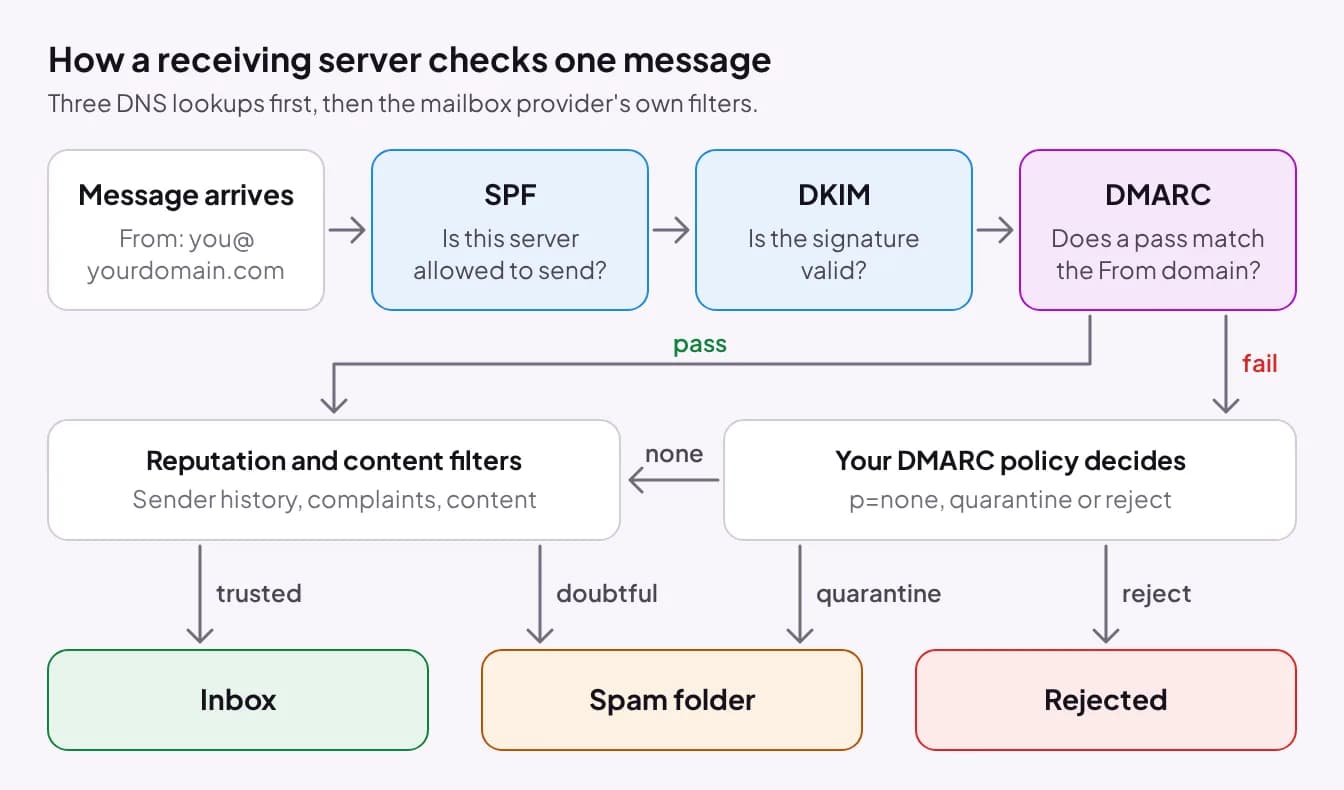
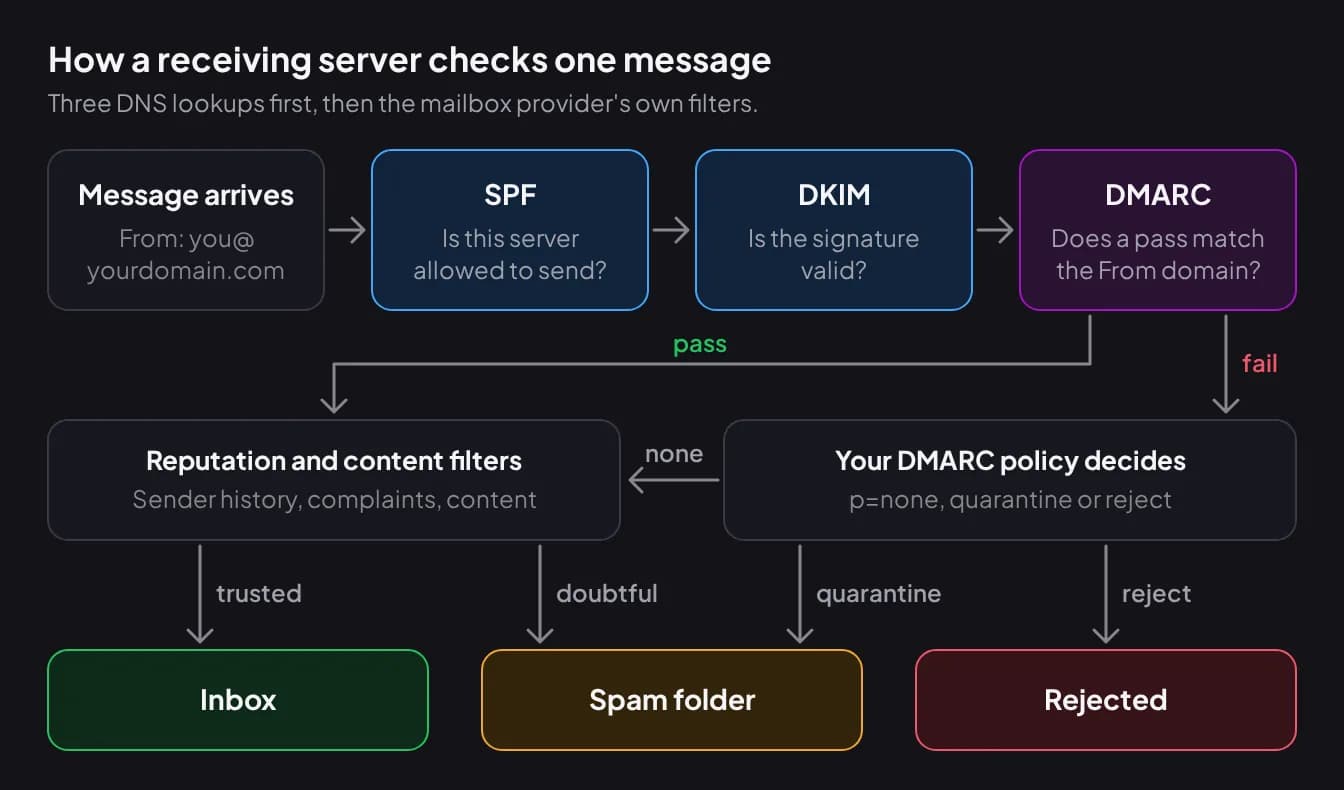
Emails from cPanel go to spam for one of two reasons: the receiving server cannot confirm the message really comes from your domain, or it can confirm that and still distrusts the sender or the content.
The first reason is authentication, and it is checked with three DNS records. SPF lists the servers allowed to send mail for your domain. DKIM adds a cryptographic signature to each message, which the receiver verifies against a public key in your DNS. DMARC ties the two to the address your reader sees: it passes when SPF or DKIM passes for a domain that matches the From address (this match is called alignment), and it tells the receiver what to do when neither does.
The second reason is reputation. Mailbox providers score the sending IP address, the domain, how often recipients mark your mail as spam, and the message itself. Authentication gets you judged as yourself. It does not make the judgment favorable.
How do I check what the receiving server saw?
Send a message from the affected mailbox to an account you control at Gmail, Yahoo or Outlook, then open its full headers. The receiving server writes its verdict there, so you do not have to guess which record is broken.
In Gmail on the web, open the message, click More next to Reply, then Show original. In Yahoo Mail it is More, then View raw message. Google lists the steps for other mail apps in Trace an email with its full header.
Find the line that starts with Authentication-Results. A healthy one reads like this: spf=pass smtp.mailfrom=yourdomain.com; dkim=pass header.i=@yourdomain.com; dmarc=pass header.from=yourdomain.com. Compare the domains as well as the words: a pass for your host's server name instead of your own domain is why DMARC can fail when SPF says pass.
| Result | What it means | What to fix |
|---|---|---|
| spf=fail or softfail | The sending server is not listed in your SPF record | Add that sender to your one SPF record |
| spf=permerror | The SPF record is invalid: often two SPF records, or too many lookups | Merge into one record and trim includes |
| dkim=none | The message was not signed, or the key is not in public DNS | Publish the DKIM record where your DNS is hosted |
| dkim=fail | The signature does not match the published key | Copy the DKIM value again, complete and unbroken |
| dmarc=fail | No aligned pass from SPF or DKIM | Fix DKIM first, and send from an address on your own domain |
| All three pass | Authentication is fine | Look at reputation, content and your list |
How do I fix SPF, DKIM and DMARC in cPanel?
Open Email Deliverability in the Email section of cPanel. It checks each domain's mail records and offers a Repair button when one is missing or wrong. Our shared hosting plans include this tool.
Click Repair next to the domain, review the suggested records, and confirm. cPanel then rechecks, which its documentation says can take up to five minutes. Use Manage instead if you want to see or customize each record, for example to add an include for another sender to SPF. The cPanel Email Deliverability documentation describes every option.
Repair has one limit that catches many people: it can only write records when the hosting server runs your domain's DNS, meaning the domain uses your host's nameservers. If your nameservers point anywhere else, cPanel can generate the records but nobody outside will see them until you publish them yourself.
The tool also shows a reverse DNS (PTR) row. That record belongs to whoever controls the IP address, which on shared hosting is the host and not the customer. If it shows a problem on a Shroti Host account, open a support ticket in the client portal and include the domain name.
What if my DNS is at Cloudflare or my registrar?
When your DNS is hosted outside cPanel, copy the records from Email Deliverability and add them by hand in that DNS panel. In cPanel, click Manage next to the domain and use Copy on the name and the value of each suggested record. If you are unsure where your DNS lives, check which nameservers the domain uses: how to point a domain to hosting explains both setups.
| Record | Type | Name (host) | Value pattern |
|---|---|---|---|
| SPF | TXT | @ (the bare domain) | v=spf1 followed by your server and any other senders, ending in ~all |
| DKIM | TXT | default._domainkey | v=DKIM1; k=rsa; p= followed by a long public key |
| DMARC | TXT | _dmarc | v=DMARC1; p=none; rua=mailto:dmarc@yourdomain.com |
Three details cause most failures here. First, paste the DKIM value as one unbroken string, with no spaces or line breaks added in the middle of the key. Second, enter only the host part if your DNS panel appends the domain for you, or you will create default._domainkey.yourdomain.com.yourdomain.com. Third, edit the existing SPF record if there is one, instead of adding a second.
On Cloudflare, keep the mail hostname (the A record your MX points to) set to DNS only. Cloudflare's own guide to setting up email records says it does not proxy SMTP traffic by default, so a proxied mail hostname breaks delivery. TXT records are never proxied. If record types are new to you, read DNS records explained first. After saving, go back to Email Deliverability and reload: it checks public DNS, so the rows turn valid once the records are visible.
Why must a domain have only one SPF record?
A domain must have exactly one SPF record because the SPF standard treats two as an error. RFC 7208 says a check that finds more than one record returns permerror, and receivers then treat SPF as failed for every message you send.
This happens when a second service is added later. You set up hosting, then Google Workspace, Zoho Mail or an invoicing tool, and each setup guide says "add this TXT record". The fix is to merge them: keep one record that starts with v=spf1, list every sender inside it, and end with a single ~all. For example: v=spf1 +a +mx include:_spf.google.com ~all covers the hosting server and Google Workspace together.
List every system that sends as your domain: the hosting server (website forms and cPanel mailboxes), your mailbox provider if it is separate, and any billing, CRM or helpdesk tool. Remove senders you no longer use, including the old server's IP address if you have switched web hosting. The same RFC limits a record to 10 DNS lookups across include, a, mx and similar terms, and going over also returns permerror.
How should I roll out DMARC?
Start DMARC at p=none with a reporting address, read the reports for a few weeks, then tighten to quarantine and finally reject. Jumping straight to reject is how a business blocks its own invoices, because some forgotten system was sending as the domain without passing SPF or DKIM.
The rua tag asks receivers to send aggregate reports, usually once a day, to the address you give. They are XML files listing which IP addresses sent mail as your domain and whether each passed. Use a dedicated mailbox, or a DMARC report reader if the volume is more than you want to open by hand.
| Stage | Record value | What receivers do with failing mail | Move on when |
|---|---|---|---|
| 1. Monitor | v=DMARC1; p=none; rua=mailto:dmarc@yourdomain.com | Nothing extra. They only report | Every real sender in the reports passes |
| 2. Quarantine | v=DMARC1; p=quarantine; rua=mailto:dmarc@yourdomain.com | Treat it as suspicious, usually the spam folder | Reports stay clean and nobody misses mail |
| 3. Reject | v=DMARC1; p=reject; rua=mailto:dmarc@yourdomain.com | Refuse it | This is the final state. Keep reading the reports |
WordPress and contact form emails: send through SMTP
WordPress mail lands in spam most often because the site sends through PHP mail with a From address that does not match the domain. By default the message leaves as the hosting account's system user, so SPF and DKIM may pass for the server's name while the visible From address is something else, and DMARC fails on alignment.
The fix is to send through an authenticated mailbox. Create an address such as hello@yourdomain.com in cPanel, install an SMTP plugin, and enter the mailbox's SMTP host, port, username and password. Set the From address to that same mailbox. Mail now leaves the way it would from a mail app, signed by your domain.
For contact forms, never put the visitor's address in the From field. A form that sends "from" a visitor's gmail.com address is sending as a domain you are not authorized for, and Google's guidelines say not to impersonate Gmail From headers. Send from your own mailbox and put the visitor's address in Reply-To.
What do Google and Yahoo require from senders?
Google and Yahoo both publish minimum requirements for anyone who sends to their mailboxes, with a stricter set for bulk senders. The table summarizes Google's email sender guidelines and Yahoo's sender best practices as published on 20 November 2026. Read the originals before you rely on them, because both pages change.
| Requirement | Google (Gmail) | Yahoo |
|---|---|---|
| Who counts as a bulk sender | More than 5,000 messages per day to Gmail accounts | The page gives no number |
| Authentication, all senders | SPF or DKIM | SPF or DKIM at a minimum |
| Authentication, bulk senders | SPF, DKIM and DMARC. The DMARC policy can be none | Both SPF and DKIM, plus a valid DMARC policy of at least p=none that passes |
| Alignment, bulk senders | From domain aligned with the SPF domain or the DKIM domain | From domain aligned with the SPF or the DKIM domain. Relaxed alignment is acceptable |
| Reverse DNS | Valid forward and reverse DNS (PTR) records for sending domains or IPs | Valid forward and reverse DNS record for sending IPs |
| Spam rate | Below 0.3% in Postmaster Tools. Google recommends staying below 0.1% | Below 0.3% |
| Unsubscribe, bulk senders | One-click unsubscribe and a clearly visible unsubscribe link in marketing and subscribed messages | A working list-unsubscribe header with one-click unsubscribe for marketing and subscribed messages. Honor unsubscribes within 2 days |
| Message format | RFC 5322. Do not impersonate Gmail From headers | RFCs 5321 and 5322 |
Google also asks all senders to use a TLS connection for transmitting email, and says mail that fails these checks might be marked as spam or rejected. A small business sending a few dozen messages a day is not a bulk sender, but setting up all three records anyway costs nothing and removes the most common reason for the spam folder.
Everything passes and mail still lands in spam
If SPF, DKIM and DMARC all pass and mail still goes to spam, the cause is reputation or content. Work through these in order.
- Shared IP reputation. On shared hosting many accounts send from the same IP address. Google's guidelines say any sender's activity on a shared IP affects the reputation of all senders on it. Copy the sending IP from the Received lines of your test message, look it up on a public blocklist checker, and send the result to your host in a support ticket.
- A new domain or a sudden jump in volume. Google advises starting with a low volume to engaged recipients and increasing slowly. A domain registered last week that sends 400 identical messages looks like a spammer's.
- Content. Write a plain message with a clear subject. Avoid link shorteners, a single large image with no text, attachments on a first contact, and links to domains unrelated to yours.
- List hygiene. Mail only people who asked for it, remove addresses that bounce, and stop mailing people who never open. Spam complaints are the signal Google and Yahoo put a number on.
- Recipient habits. Ask regular contacts to mark one message as not spam or add you to their contacts. It only trains their own mailbox, but that is the mailbox you care about.
Be realistic about what shared hosting email is for. It suits person-to-person mail and transactional messages a site sends one at a time: enquiries, order confirmations, password resets. It is the wrong place for newsletters and marketing campaigns. Every host limits how fast an account can send, the IP is shared, and bulk mail needs one-click unsubscribe, bounce handling and complaint tracking that a mailbox does not provide. Send those through a dedicated email service on a subdomain such as news.yourdomain.com, with its own SPF include and DKIM key, so a bad campaign cannot damage the reputation of your everyday mail.
If you are a Shroti Host customer and the records are valid but a specific provider keeps filtering you, open a support ticket in the client portal and attach the full headers of one affected message. Headers show us where the message went and what the receiver decided. Mailboxes on your own domain are included with every Shroti Host hosting plan, and the records in this guide are the same on any cPanel host.
Frequently asked questions
How long does it take for SPF, DKIM and DMARC changes to work?
The records work as soon as receiving servers can see them, which depends on the TTL of the old records and is usually minutes to a few hours. Reputation takes longer. If your domain or IP was already being filtered, expect several days to a few weeks of clean, wanted mail before placement improves. No setting forces a mailbox provider to trust you sooner.
Do I need DMARC if I only send a few emails a day?
Google and Yahoo require DMARC only from bulk senders, and Google sets that line at more than 5,000 messages a day to Gmail accounts. It is still worth publishing a p=none record with a reporting address. It takes one TXT record, shows you who is sending as your domain, and stops other people from using your domain unnoticed.
Should I end my SPF record with ~all or -all?
Use ~all (soft fail) while you are still finding every system that sends for your domain. cPanel's Email Deliverability tool uses ~all by default and lets you switch to -all. Move to -all (hard fail) only once DMARC reports show every legitimate sender passing, because a hard fail gives receivers a reason to refuse mail from any sender you forgot.
How do I check if my hosting server's IP is on a blocklist?
Send yourself a test message, open the full headers, and copy the IP address from the Received line added by your hosting server. Paste it into a public blocklist lookup tool. One listing on a minor list rarely matters. A listing on a major list does, and only the party that controls the IP can request removal, so pass it to your host in a support ticket.
Will a dedicated IP stop my emails going to spam?
Only if you send enough steady, wanted mail to build that IP's reputation yourself. A new dedicated IP has no history, and low or irregular volume gives providers little to judge. For a small business sending ordinary correspondence, correct SPF, DKIM and DMARC plus a clean list do far more. High-volume senders are better served by a dedicated email service.
Does SpamAssassin in cPanel affect my outgoing email?
No. The spam filter you configure in cPanel scores mail arriving in your own mailboxes. It has no say over how Gmail, Yahoo or Outlook treat messages you send. Their filters use their own data: authentication results, the reputation of your IP and domain, complaint rates and the content of the message.
Can I send my newsletter from a cPanel mailbox?
You should not. Hosting accounts are rate limited for outbound mail, the sending IP is shared with other customers, and a mailbox has no one-click unsubscribe, bounce handling or complaint tracking, which Google and Yahoo expect from bulk senders. Use a dedicated email service on a subdomain of your domain, and keep the cPanel mailbox for conversations and transactional mail.
#email#cpanel#dns#deliverability
See shared hosting plans
cPanel hosting with mailboxes on your own domain and the Email Deliverability tool, from ₹49/month excl. service fee. Built for business correspondence and site mail. Newsletters belong on a dedicated email service.
7-day money-back guarantee · Same renewal price, every cycle